





















Pokémon GO encourages players to explore the real world, but not everyone has the time or ability to travel long distances to catch rare Pokémon or join raids. That’s why many players look for GPS spoofing tools that allow them to change their GPS location and play the game more conveniently. With the right spoofer, you can explore different regions, find rare Pokémon, and participate in global events without leaving home. In this guide, we’ll introduce 3 best Pokémon GO spoofers for iOS and Android, compare their features, and help you choose a safe and effective tool to enhance your gameplay experience.
What Makes a Best Pokémon GO Spoofer?
When people look for the best spoofer for Pokémon GO, they usually care about these points:
- iOS and Android support: A strong compatibility that supports both iOS and Android
- No jailbreak/root required: Easier and safer for most users.
- Joystick and route simulation: Helps players “walk” in-game and hatch eggs.
- Stable performance: Fewer crashes and fewer “failed to detect location” errors.
- Lower ban risk features: Things like realistic speed, cooldown reminders, and natural movement.
3 Best Pokémon GO Spoofers for iOS and Android
Spoofer 1. PoKeep Location Changer
PoKeep Location Changer is a strong option if you want a reliable Pokémon GO spoofer experience with realistic movement. It is widely used as a GPS simulation tool that can create routes and simulate walking in a more human-like way.
PoKeep focuses on making location changes look natural. For Pokémon GO, that matters because unnatural jumps and high-speed travel can trigger anti-cheat systems. No spoofer is “ban-proof,” but realistic behavior can help reduce obvious red flags.
Why PoKeep Location Changer Stands Out
- One-click location change to anywhere in the world
- Teleport mode and route mode for controlled movement
- Adjustable speed to simulate realistic movement, including walking, cycling, driving
- Works for other apps that use GPS like social, maps, and dating apps.
- Often supports the latest iOS and Android versions and almost all phone models.
- A safer Pokémon Go spoofing without jailbreaking and rooting
- A cooldown time feature to reduce the risk of getting banned.
Best for: players who want a safe and reliable Pokémon GO spoofer that feels straightforward and stable.
Spoofer 2. TunesKit Location Changer
TunesKit Location Changer is a beginner-friendly GPS location spoofer that works for many location-based apps, including Pokémon GO. It is designed for users who want a clean interface and simple controls to change location fast.
Key features
- Teleport to any location quickly
- Two-spot and multi-spot movement for custom routes
- Joystick mode for a freely control
- Speed customization with realistic presets
- Works with almost all iOS and Android devices
Best for: players who want free-controlled, natural GPS movement, and one-click teleporting.
Spoofer 3. iPogo
iPogo is well-known in the Pokémon GO hack community, it also works for both iOS and Android. Unlike basic GPS location changers, iPogo often includes extra features that feel “built for Pokémon GO,” such as teleport to raids, skip animations, and auto catch. But iPogo is more game-focused and uses modified app methods or special installs, which can come with a higher detection risk compared to simple location simulation.
Key features
- Extra quality-of-life tools that reduce manual grinding
- Teleport anywhere instantly and Joystick movement without walking.
- Auto-walk with custom or preset paths.
- Automatically catch Pokémon and spin PokéStops.
- Detect shiny Pokémon and check IVs in real time.
Best for: advanced iOS players who want extra Pokémon GO tools, not just GPS spoofing.
How to Spoof Pokémon GO with PoKeep Location Changer
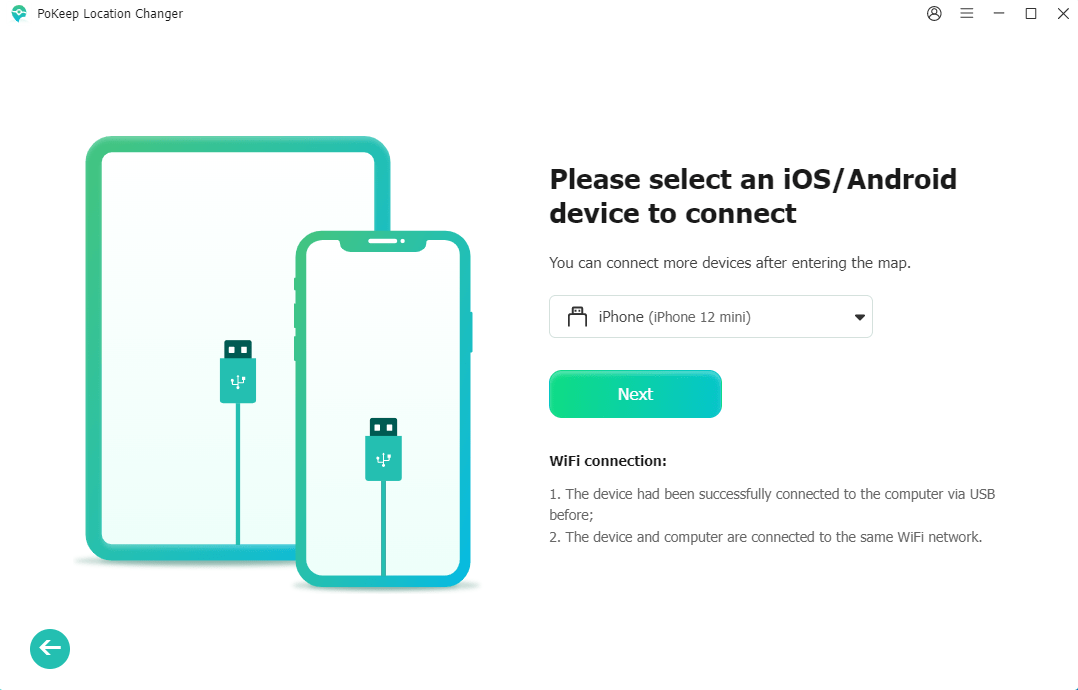
Step 1: Install PoKeep and connect your device
Download and install PoKeep Location Changer on your computer (Windows or Mac). Open the program, then connect your device using a USB cable. If your phone asks for permission, tap Trust (iOS) or allow USB debugging (Android).
Step 2: Choose a spoofing mode
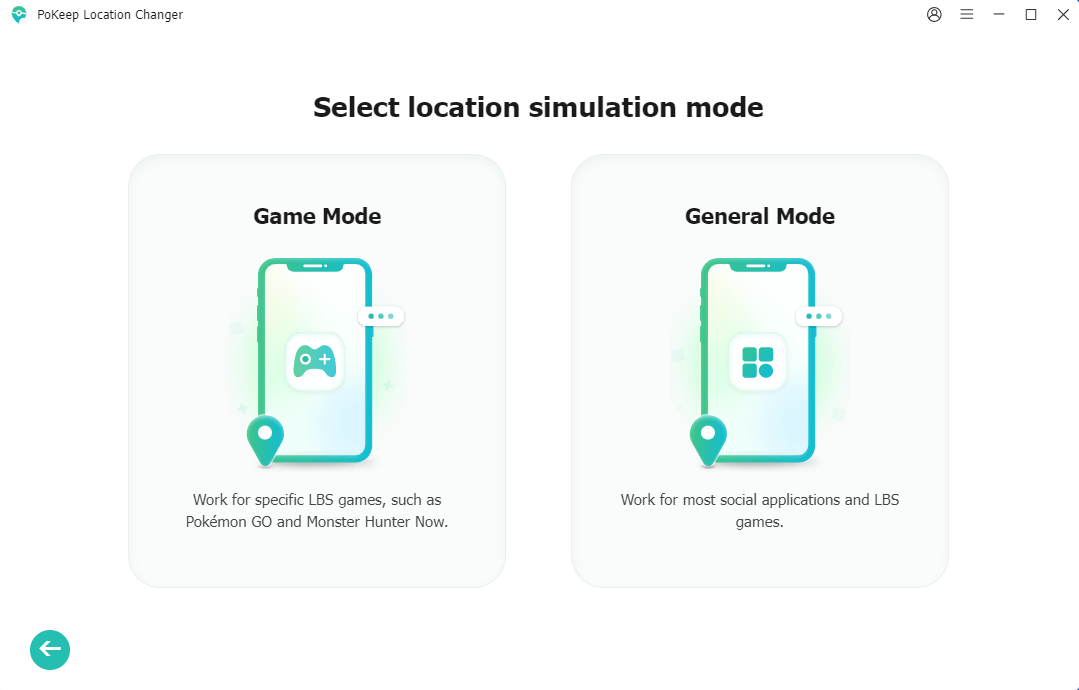
Choose Game Mode. After entering the main map screen, pick the mode that matches your goal:
- Teleport Mode: instantly change your GPS to a new city or coordinates.
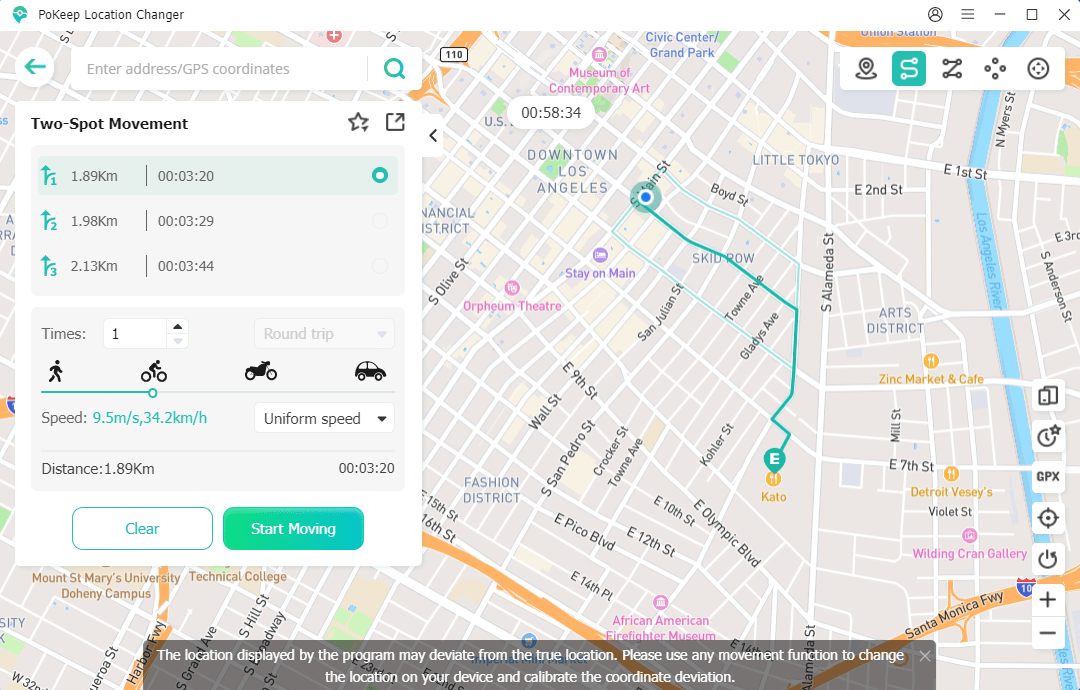
- Two-Spot Movement: move between two points at a set speed.
- Multi-Spot Movement: build a longer walking route for PokéStops and eggs.
- Joystick Movement: 360-degree free control with natural movement patterns
Step 3: Set your destination (or create a route)
Use the search bar to enter an address, city name, or GPS coordinates. For routes, click points on the map to create a path. Set a realistic speed, such as walking, to make movement look natural.
Step 4: Start spoofing
Launch Pokémon GO on your phone, click Start Modifying in PoKeep. Your in-game character should appear at the new location.
Tips to Reduce Risk When Spoofing in Pokémon GO
There is no guaranteed safe method. But if you want to try Pokémon Go spoofing, these habits may help you avoid obvious triggers:
- Follow cooldown times. If you teleport from New York to Tokyo and instantly spin a PokéStop, that is suspicious. Wait a realistic time.
- Use realistic walking speeds. Stay close to normal human speeds for walking and cycling.
- Avoid constant extreme jumps. Build a normal play pattern in one city or region.
- Do not abuse raids or gyms. Repeating fast raid jumps all day can look unnatural.
- Use a secondary account for a test. Keep your main account safer.
FAQs
1. Can you spoof Pokémon GO without getting banned?
No spoofer is truly “ban-proof.” Niantic can detect unusual behavior. The best you can do is reduce risk by using realistic movement and using a reliable tool like PoKeep Location Changer.
2. Are Pokémon GO spoofers free?
Some offer free trials or limited features. Many require a paid license for full route simulation, joystick control, or longer sessions.
3. What is a Pokémon GO cooldown time, and why does it matter?
A cooldown is the waiting time after you change locations before you do actions like spinning a PokéStop, catching Pokémon, or battling in a gym. If you act too quickly after a long-distance jump, Pokémon GO may flag the behavior as unnatural.
Conclusion
If you want a simple and beginner-friendly way to change your location in Pokémon GO, PoKeep Location Changer is a strong option to start with. It gives you clear controls for teleporting and route movement, so you can explore new areas, reach more PokéStops, and simulate walking without complicated setup. Just remember to use realistic speeds and avoid frequent long-distance jumps, because safer-looking movement patterns can help reduce unwanted issues while you play.
Like our Facebook Page here at NasiLemakTech.com for more news and in-depth reviews! Also, join our Facebook Group for insightful information and memes!
Subscribe to our YouTube channel too!

