





















There are many cases in the market these days – and the brand new Cooler Master MasterBox MB600L that was announced here is one of them. Now, we have one in our labs – so let’s take a look at what’s good and what’s not about this budget-oriented PC case.
We should also note that the variant of the MasterBox MB600L that we have here is with a red trim and no ODD bay. There are other trim color options and has a single ODD bay, too.
Unboxing
The usual here from Cooler Master. The box itself takes on a simple cardboard design, and unboxing it is rather simple and straightforward. Just cut it open and flip the box, revealing thick styrofoam on both ends to protect the case from damages.
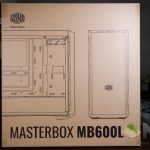
The entire case is also wrapped in plastic, like any other case.
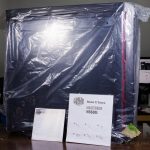
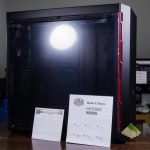
Opening it up reveals the case itself together with a user manual and a warranty guide that’s packaged together with the case.
Under the power supply shroud is where the accessories pack is found. Just a bunch of screws and some zip ties. Pretty standard.
[nextpage title=”Design”]
Here’s where things get interesting. A while back, we did a collaboration with Tech Critter on showcasing an RGB build with the MasterBox Lite 5. Guess what – Cooler Master used the same chassis design and the same side panels for the MasterBox MB600L too. Cooler Master only changed the front bezel and included an ODD bay – if you chose that variant of the MasterBox MB600L, that is.

The overall design is pretty simple for the MasterBox MB600L. It has a simple box design. It doesn’t even have a top vent. However, it has a very darkly tinted front bezel with openings at the sides only.

The feet at the bottom does resemble the MasterCase 5 too.

Speaking of the bottom, there are 4 little rubber feet that are raised to prevent choking the power supply on carpeted floors too. However, the raise isn’t that far high. Take precautions.

[nextpage title=”Specifications & Features”]
| Product Name | MasterBox MB600L | |
| Model Number | MCB-B600L-KA*N-S** | |
| Available Color | Black | |
| Materials | Steel, Plastic | |
| Dimensions (LxWxH) | 464 x 212 x 454.5mm | |
| Motherboard Support | ATX, Micro-ATX, Mini-ITX | |
| Expansion Slots | 7 | |
| Drive Bays | 5.25″ | No (MCB-B600L-KANN-S**) 1 (MCB-B600L-KA5N-S**) |
| Combo 3.5″ / 2.5″ | 2 | |
| SSD | 1 | |
| I/O Panel | USB 3.0 x 2, Audio in / out | |
| Pre-installed Fan(s) | Front | N/A |
| Rear | 120mm x 1 black fan | |
| Fan Support | Front | 120mm x 2 / 140mm x 2 (w/ODD) 120mm x 3 / 140mm x 2 (wo/ODD) |
| Rear | 120mm x 1 | |
| Liquid Cooling Support | Front | 120/140/240/280mm radiator (w/ODD) 120/140/240/280/360mm radiator (limited) up to 50mm thickness without fan (wo/ODD) |
| Rear | 120mm x 1 | |
| Clearance | CPU Cooler | 160mm / 6.3″ |
| PSU | 180mm / 7.1″ | |
| GPU | 400mm / 16.14″ | |
| Cable Routing | Behind Motherboard Tray | 15mm – 23mm / 0.59″ – 0.90″ |
| Dust Filters | Front, bottom | |
| Power Supply Support | Bottom mount, ATX | |
All I can say is this – the MasterBox MB600L is made with one simple goal in mind – to incorporate liquid cooling for budget cases, while having the option to bling it up a little. This can be seen prominently as the front of the case can actually hold up triple 120mm fans with no issues. You can even mount a 360mm radiator if you wish to do so.
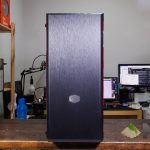
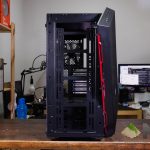
Though that comes with a price. Personally, I’d prefer the case to have top vents so that the radiator can be mounted up above instead. Hot air can be exhausted right away. However, the MasterBox MB600L does not have any openings at the top at all – and there’s another issue.

Take a look at the front panel. The openings at the sides are tiny. These tiny openings are quite restrictive when it comes to airflow, which is a bad thing.

The MasterBox MB600L doesn’t have any front intake filters too, as Cooler Master solely relies on the mesh on the openings to filter out the dust and particles. There is, however, a little mesh net for the power supply. I mean, it’s better than nothing.
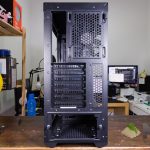
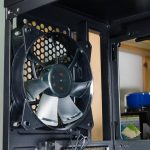
One thing I do like is the fact that the rear fan can be repositioned slightly in the z-axis, so you can get a more direct airflow from your CPU tower cooler.

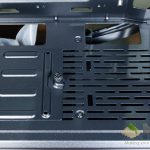
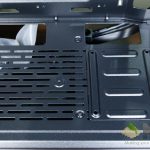
Another weird thing is that Cooler Master only includes a single 2.5-inch drive mount, but gives you a total of 3 options position it. Either at the front, or at the power supply shroud. If you want to mount another SSD, then you’re out of luck, basically.
[nextpage title=”Building experience”]
Let’s begin by first stripping down the case to its barebones.
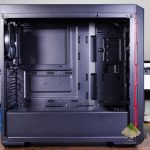
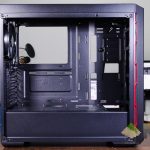
Building a rig inside the MasterBox MB600L is rather easy. There are motherboard standoff anchors to pin down the motherboard so that you can screw it in without an issue. Though, there are a few complaints that I have – particularly in terms of cable management.

Routing cables through the small little EPS cable cutout at the top left corner is quite difficult since it can barely fit in the 8-pin EPS connector. The 2.5-inch disk mount is the second issue I have. The MasterBox MB600L only comes with one 2.5-inch disk caddie, but has a total of 3 different mounting points for aesthetic purpose. Each of them, however, pose a real challenge when it comes to cable management again.

Which leads me to the next point – the power supply shroud. It’s short. So short that the power supply cannot fit in from the side, and have to be slide in through the back and mounted to the case via a power supply cage. Then, there’s the non-removable 3.5-inch hard disk cage not far off from the power supply, which makes it really difficult to hide cables – especially if you’re using a non-modular power supply.

The case’s width is another issue – as the tinted acrylic side panel will get poked and convex outwards if a wider graphics card is used. There will be gaps at the side, sucking unfiltered air into the case and bulking up in dust.
 Once the entire setup is done, it looks rather sleek, to be honest. Clean angles from all throughout the case, which is exactly what I’m looking for, personally. Though the front panel’s restrictive airflow is indeed an issue.
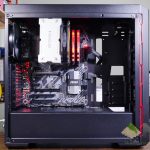
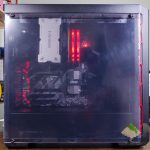
As the case can support up to a 160mm for CPU coolers. Large air coolers like the Noctua NH-D15 and the REEVEN Ouranos can indeed fit inside without an issue. However, it can’t fit in the second fan.

[nextpage title=”Wrapping up the Cooler Master MasterBox MB600L review”]
For all I can say, the MasterBox MB600L needs to be judged with its price in mind. For only RM199, you get quite a lot for the price. But then again, looking at the other Cooler Master cases that are available for this price, you can also get the legendary CM690 III for just RM199 – albeit an old case but powerful nonetheless. At least the CM690 III has vents at the top and a breathable front panel.

If you care about aesthetics and want a little bit more bling, then there’s the MasterBox Lite 5 too, which is priced at RM193. We did an RGB build together with Tech Critter right here in this video. The main difference between the MasterBox Lite 5 and MasterBox MB600L is the front panel and also the inclusion of RGB fans at the front. Other than that, they’re the same.

Overall, I can recommend the MasterBox MB600L for setups with at most two 3.5-inch HHDs and one single 2.5-inch disk drive. Other than that, cable management is definitely a challenge in the MasterBox MB600L, but manageable and it works without a hitch after everything is set up.
Just be mindful of the front panel intake – those slits at the sides are not sufficient.
Like our Facebook Page here at NasiLemakTech.com for more news and in-depth reviews! Also, join our Facebook Group for insightful information and memes!
Subscribe to our YouTube channel too!

