



Apple’s WWDC 2024 conference has concluded and well there’s news that is well received and there’s also something that most people don’t really mind or care so let’s quickly breeze through what’s new and I’ll list down minute things for easier reading.
Apple Intelligence

So let’s cut to the chase first and introduce the new Apple Intelligence (Yup, literally AI now). This on-device AI assistant feature covers the big 3 of iPhone, iPad, and Mac and will learn through everything general and personal to give you the best contextual response in accordance with your prompts and requests.
Powered by its in-house Apple Silicon chip, everything it does is strictly within the chip – language understanding, image creation, and personal context. Although certain aspects will inevitably involve the cloud in some way, Apple promises that every user will get its own Private Cloud Compute for absolute privacy respect.
They even say that no data is kept in their servers long-term and experts can always inspect codes on their servers for more transparency.
Oh yeah, ChatGPT is officially within the big 3 following Apple Intelligence too and it can be found across systemwide Writing Tools and Compose Tools in Pages. The GPT-4o model will be the one handling all your requests.
Here are other things that you may find interesting in regards to this:
Text-based Wonder
- Systemwide Writing Tools for rewriting, proofreading, and summarizing text.
- Writing Tools integrated into Mail for email enhancement.
- Priority Messages, Smart Reply, and Summary features in Mail for better email management.
- Writing Tools also extend to Notifications for better summarization and prioritization.
Image Playground
- Allows users to create fun images using Animation, Illustration, or Sketch styles.
- Integrated into Messages and available as a dedicated app.
Genmoji
- Users can create original Genmoji based on descriptions or photos.
- Genmoji can be used inline in messages or shared as stickers.
Photos
- Natural language search for specific photos and videos.
- Clean Up tool to remove distracting objects from photos.
- Memories feature creates personalized memory movies using language and image understanding.
Siri Enhancements
- More deeply integrated into the system experience.
- Richer language understanding, ability to follow along, and maintain context.
- Users can type to Siri for communication.
- Siri can perform actions across apps based on on-screen content.
- Tailored intelligence based on on-device information.
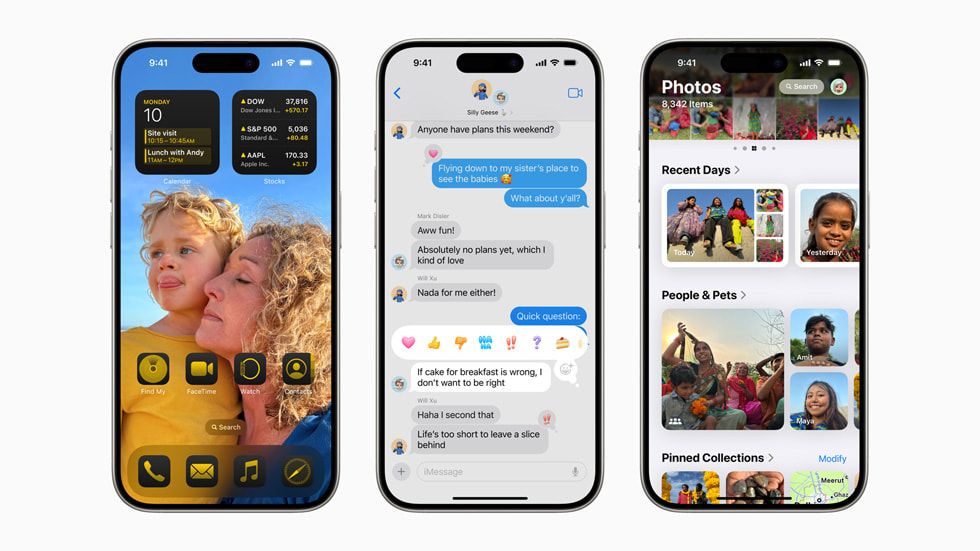
So that’s (AI) done, and several UI optimizations have been given as well. Particularly the home screen now can have apps and widgets in any open space as well and lock screens having customizable buttons. The control center now has better quick-access tabs too.
The Photos app can now run in either Unified View for a dashboard-like quick overview of all photos or Carousel View that highlights favorite subjects like people, pets, places, and more. One may also organize and pin stuff or autoplay content.
For Messages, finally, RCS support is here to get non-Apple contacts into the loop in addition to communications connection via satellite. New text effects like bold, underline, and italics, are in as well.
And here are the tidbits things that will make your life easier.
- Inbox Management: On-device categorization into Primary, Transactions, Updates, and Promotions.
- Digest View: Aggregates relevant emails from a business.
Safari
- Highlights: Surfaces key information about a webpage using machine learning.
- Reader Mode: Redesigned with summary and table of contents for long articles.
Passwords App
- Access: Manage passwords, passkeys, Wi-Fi passwords, and verification codes.
- Alerts: Notifications for weak, reused, or compromised passwords.
Privacy Features
- Locked and Hidden Apps: Hide and lock apps for privacy.
- Selective Contact Sharing: Share specific contacts with apps.
- Accessory Connection: Seamlessly connect third-party accessories without exposing other devices on the network.
Additional Features
- Apple Maps: Browse hikes, create custom walking routes, and save favorite spots.
- Game Mode: Enhanced gaming experience with consistent frame rates and responsive wireless accessories.
- Apple Pay: New ways to pay, including redeeming rewards and Tap to Cash.
- SharePlay with Apple Music: Share control of music playback across devices.
- AirPods Updates: Improved call quality, personalized Spatial Audio, and responsive Siri interactions.
- Notes App: Math Notes for solving formulas and equations instantly.
- Journal App: Insights view, search, and sort entries, mindful minutes tracking.
- Calendar App: Integrated events and tasks from Reminders.
- Health App: Redesigned Medical ID and pregnancy health insights.
- Emergency SOS Live Video: Share live video or media during emergency calls.
- Home App: Guest access and hands-free unlock with home keys.
- Accessibility Updates: Eye Tracking, Music Haptics, and Vocal Shortcuts for easier navigation and interaction.
iPadOS 18

Is this “important” enough to take up the featured slot? I think so. Because Calculator is finally available for iPads you can have an offensively expensive virtual device to compute your math problems.
But of course, it is smart and allows both typing and handwriting various mathematical expressions for instant solutions in addition to creating graphs from a set of equations.
It can also be accessible via the Notes app in the new Math Notes folder too.
Speaking of the Notes App, it is now more “sensitive” as in more accurate of accepting Apple Pencil inputs for smooth and straight handwritten text and it also has collapsible sections and new highlight colors to make your notes more fun to read.
And here’s more to you about the rest of iPadOS 18 update:
- Customization Options:
- More flexibility for Home Screen and app icons.
- Redesigned Control Centre with enhanced customization and third-party app controls.
- New floating tab bar for easier navigation within apps.
- Redesigned Photos App:
- New single-view grid and thematic collections.
- Carousel view for daily highlights.
- Customizable layout for better photo organization.
- Messages Updates:
- Advanced text formatting (bold, underline, italics) and animated text effects.
- Ability to schedule messages and react with any emoji or sticker.
- Safari Improvements:
- Highlights and redesigned Reader view for streamlined web browsing.
- Machine learning to surface key webpage information.
- Enhanced Privacy Controls:
- Locked and hidden apps to secure sensitive information.
- Granular control over app access to contact information.
- New Bluetooth accessory pairing privacy features.
- Advanced Writing and Image Tools:
- Systemwide Writing Tools for rewriting, proofreading, and summarizing text.
- Enhanced Memories feature in Photos for creating narrative movies.
- Image Playground: Create images in Animation, Illustration, or Sketch styles.
Additional Updates
- New Passwords app for secure credential storage.
- Improved SharePlay for collaborative screen sharing and device control.
- Enhanced Freeform for better idea presentation.
- New gaming features like Game Mode and Personalised Spatial Audio.
- Calendar integration with Reminders for event and task management.
- Expanded Apple Maps features for hiking and custom routes.
macOS Sequoia
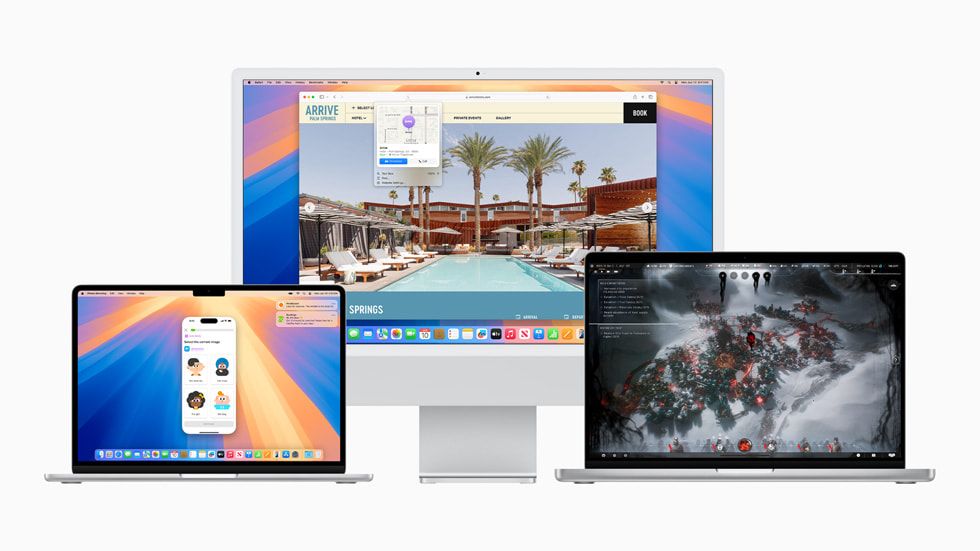
The next version of macOS is called Sequoia and here I thought the Apple ecosystem is about seamless transition between devices in both daily usage and productivity but apparently it’s not.
To start, the Continuity circle now envelops the function of iPhone mirroring which means you can have full access and control to your iPhone directly from your Mac and Macbook and do things like drag and drop content, receive notifications, and use iOS apps.
For the “Mac Gaming” gaming, you’ll get some titles to play including Assassin’s Creed Shadows, Frostpunk 2, Prince of Persia: The Lost Crown, and more. The addition of Game Mode further enhances the experience through personalized spatial audio, reduced audio latency, and optimized FPS.
Safari is also pretty cool now (aside from claiming that it lasts longer watching videos via it than Chrome which is true on every other browser) since it can highlight important information, streamline summaries and ToCs, and put videos front and center with full playback controls.
- New Passwords App:
- Built on Keychain, it centralizes access to passwords, passkeys, Wi-Fi passwords, and other credentials with end-to-end encryption.
- Window Tiling:
- Easier and faster window arrangement with automatic tiling suggestions when dragging windows to the screen edge.
- Video Conferencing Improvements:
- Presenter preview for easier presentation management.
- Background replacements for video calls with built-in and custom backgrounds.
- Additional Features:
- Messages: New text effects, emoji, sticker Tapbacks, and scheduled messaging.
- Apple Maps: Curated hikes and custom walking routes, including thousands of hikes in US national parks.
- Photos: Collections for automatic library organization and improved search.
- Notes: Smarter note-taking with audio transcription, summarization, and equation solving.
- Calculator: History of calculations and live expression updates.
- Calendar: Integrated view of events and tasks from Reminders with an updated monthly view.
- Privacy and Security:
- Private Cloud Compute for AI processing ensures privacy by keeping data inaccessible to Apple and using it only to fulfill user requests.
watchOS 11
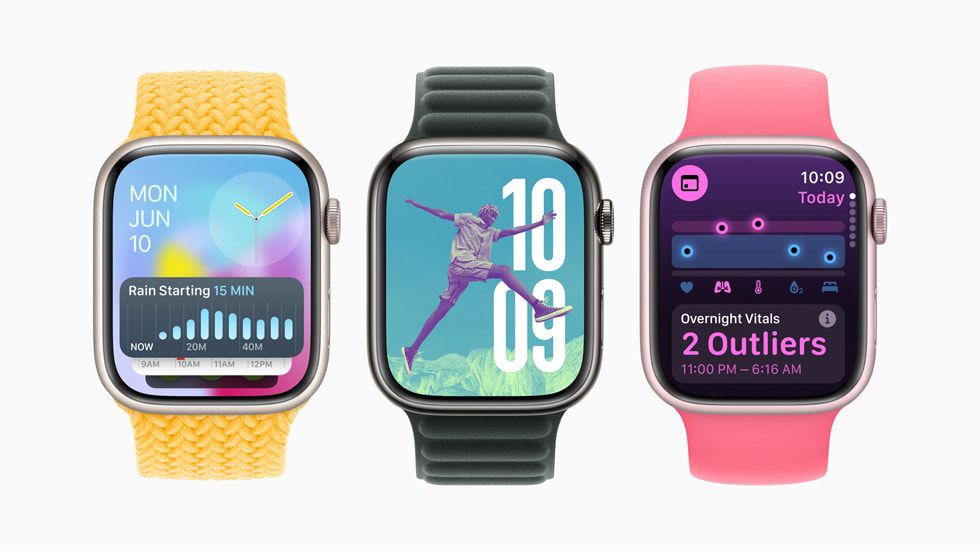
The smart wearable welcomes watchOS 11 and for this round, Apple is focusing on the wellbeing and health aspects. Starting with the new Vitals app, it can clearly display health metrics like heart rate, respiratory rate, wrist temperature, sleep duration, and blood oxygen with users receiving notifications when two or more metrics are out of their typical range and detailed messages on potential causes.
One can also enjoy training parameters in exercises including workout intensity and duration impact on the body over time. Users are informed about their training load through the calculation of effort ratings and workout data.
For fellow moms (or soon-to-be moms), the app can track gestational age, logging symptoms, and mental health assessment reminders, and alert to potential fall risks.
As for general UI tunings, one may use their Activity rings without affecting award streaks and set custom goals by the day of the week. On the other hand, Smart Stack now includes new widgets and suggests widgets based on time, date, location, and routines while the Photos Face uses machine learning to select and optimize photo compositions.
Connectivity and Convenience
- Check-in: Allows users to share their location and status with friends or family during workouts or other activities.
- Translate App: Supports 20 languages, providing translations directly on the wrist and suggesting relevant translations based on location.
- Double Tap Gesture: Can be used to scroll through apps like Messages, Calendar, and Weather.
Additional Features
- Enhanced Workout Types: New workout types like Soccer, American Football, Outdoor Hockey, and more, with improved GPS positioning for distance tracking.
- Custom Workouts for Pool Swim: Supports interval-based workouts with haptic signals.
- Apple Maps: Offline access to hike guides for U.S. national parks and user-created walking routes.
- Summarized Notifications: Forwarded from iPhone 15 Pro to Apple Watch, enhancing user awareness.
- Enhanced Ticketing: Improved information in Apple Wallet with live activity updates for events.
visionOS 2

Ah yes, the infamous Vision Pro’s operating system. If you’re still sticking with then you’ll probably appreciate these.
Users can create spatial photos from their existing 2D images, bringing depth and realism alongside new hand gestures to navigate easier and access key features.
The Mac Virtual Display now comes with higher resolution, larger size, and mouse support and if you’re using it outdoors, Travel Mode now adds support for trains to dial into even more environments.
Oh, you can also share the thing with others in Guest Mode, it now has Passwords app integration, the same level of privacy protection in Safari, as well as things like Apple TV and Mindfulness optimization.
Developer Tools
- New APIs and frameworks for developers to create more volumetric and shareable experiences.
- HealthKit integration for health and fitness apps.
- Examples include The Museum That Never Was app using volumetric APIs for immersive experiences.
Enterprise Applications
- Developers are building apps for various industries like healthcare, manufacturing, aerospace, etc.
- New tools like Barcode Scanning and Object Tracking are introduced for enterprise developers.
Immersive Video
- Utilizes 3D 8K video with Spatial Audio for immersive storytelling.
- Apple TV app features immersive films and series.
- Blackmagic Design launching a camera system and software update for Apple Immersive Video.
Additional Features
- Safari Enhancements: Watching videos in an environment, immersive browsing with panoramic photos, and Siri reading webpage content.
- Apple TV: Multiview support for sports viewing.
- Mindfulness: New capability called “Follow Your Breathing” for calmness and focus.
- Systemwide Live Captions: Helps users follow spoken dialogue, including those who are deaf or hard of hearing.
- Airplay: Allows viewing content on Vision Pro from iPhone, iPad, or Mac.
Oh yeah before we end, the Apple Vision Pro is launching in brand new countries and markets so the full list now includes:
- China mainland
- Hong Kong
- Japan
- Singapore
- Australia
- Canada
- France
- Germany
- U.K.
- U.S.
China Mainland, Hong Kong, Japan, and Singapore will have their preorders opening starting June 14 and officially launching on June 28 while the rest of the countries are doing it on June 28 for preordering and July 12 for official launch.
Like our Facebook Page here at NasiLemakTech.com for more news and in-depth reviews! Also, join our Facebook Group for insightful information and memes!
Subscribe to our YouTube channel too!