




















ChatGPT Plus is worth considering when its broader access and higher tool limits help you finish work that regularly stalls on Free. If you mostly ask occasional questions, rewrite short messages or organise ideas, start with Free. The useful comparison is how each plan handles the tasks you actually repeat, rather than how impressive the longest feature list looks.
That distinction also matters when comparing chatgpt accounts for sale. For someone drafting a few emails, the answer may be quite different from someone reviewing files throughout the working day. A paid label alone does not tell you whether the difference will matter to you.
Free already covers more than basic questions
OpenAI’s Free Tier FAQ lists web search, file and image uploads, data analysis, image creation and access to existing GPTs among Free capabilities. Availability and tool allowances matter, so check the feature inside your account. The presence of a feature and the amount you can use it are separate questions.
For everyday use, try a complete task before deciding that you need an upgrade. Ask ChatGPT to turn rough notes into an email, explain an unfamiliar setting or organise questions for a purchase. Give it a clear audience and outcome. If the result needs work, identify whether the problem is missing information, unclear instructions or an access limit.
Specific integrations can be useful without becoming a reason to subscribe on their own. The Shazam integration in ChatGPT is an example of the service doing something beyond ordinary text chat. Check the availability of the integration you want directly; an interesting feature announcement does not establish that you need Plus to use it.
What Plus changes in practice
OpenAI describes ChatGPT Plus as offering broader model and tool access, higher limits and priority during busy periods. Its listed subscription price is US$20 per month. Check the price displayed at your checkout rather than treating a currency conversion as a guaranteed Malaysian price.
Plus can still have usage limits. Its value depends partly on whether the additional capacity prevents interruptions in your particular work. Someone who needs one answer on a lunch break may see little benefit. Someone who repeatedly uploads files, revises the analysis and produces several outputs has a more substantial reason to compare the allowance.
Do not assume that a better result from one prompt proves the subscription caused it. The chosen model, supplied context and wording may also have changed. For a useful comparison, keep the source material and task consistent, note which model is available and judge whether the output is correct and usable.
| What you use | Free | Plus |
| Everyday questions and short drafts | Available | Available |
| File and image tools | Available with tool limits | Expanded access |
| Access during busy periods | Standard access | Priority access |
| Usage limits | Separate tool allowances | Higher allowances with limits still applying |
Use a real purchase decision as a first test
Take a task many readers already have: choosing between two phones. Supply the exact model names, local storage variants, your budget and the features you care about. Ask for a short comparison with links supporting factual claims. Then open those links and check that they refer to the right devices.
A review such as the OPPO Reno16 Pro review is useful source material because it goes beyond the specification sheet. Ask ChatGPT to separate the reviewer’s measured results from manufacturer specifications and subjective impressions. That distinction helps you see whether the assistant understood the evidence rather than merely producing a tidy table.
Use Free for the task first. If it completes the comparison and follow-up questions without a meaningful interruption, you have evidence that your present need is covered. If you hit a particular tool limit repeatedly, record which one. That is a much stronger reason to consider Plus than a vague expectation that every answer will improve.
Test files with a task you can verify
File work is another useful test. Upload a small expense spreadsheet and ask for totals by category, the largest entries and the assumptions used. Choose data you can check manually. A correct-looking chart is not enough if the assistant silently omits rows or combines categories you intended to keep separate.
OpenAI’s data analysis guide recommends clear column names and one record per row. It also explains how to review code-backed analysis and warns that complex or image-based files can be harder to process reliably. Prepare the input before judging the plan: a clean spreadsheet makes a fairer test than a blurry screenshot of a table.
Ask for the calculation behind one total and compare it with your own result. Then request a revision that resembles your normal workload, such as changing the grouping or excluding refunds. This reveals whether the process remains useful beyond the first response. It also shows where you spend time checking and correcting the output.
You can make the comparison more repeatable with a short instruction: group the expenses by category, exclude rows marked refunded, show the total for each group and identify any missing categories. Keep that instruction alongside the original file. If you later try another model or plan, use both again. Check whether the same rows were included before comparing speed or presentation. You now have a small reference task that reflects your own work, with an answer you can independently check. That is useful evidence even if it confirms that Free already does everything you need.
Read the limit you actually reached
ChatGPT tools can have separate allowances. Reaching an image-creation or upload limit does not tell you that every other capability has stopped. Read the notice and its reset information before deciding what to do next. A message about a full conversation is also different from a tool allowance being exhausted.
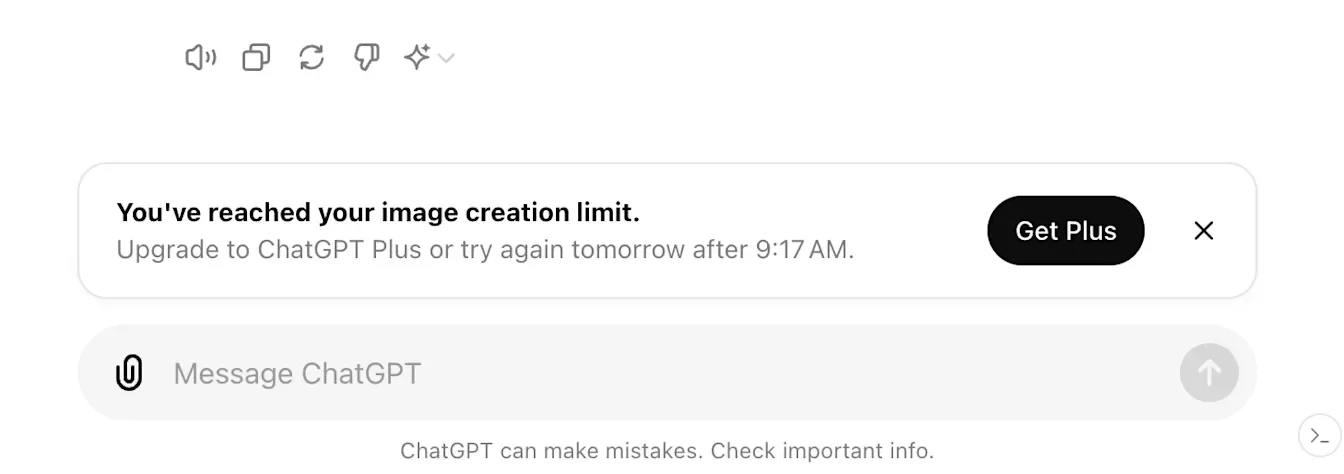
For a few days, keep a brief note of what you wanted to finish, where you stopped and how disruptive the wait was. Exclude interruptions caused by missing information or a task that needed clearer instructions. You are trying to measure the benefit of more access, so keep that separate from the quality of the task you supplied.
Choose according to the work you repeat
Stay with Free while it handles your normal tasks comfortably. Consider Plus when you can name the feature or capacity you need and explain how often the current allowance gets in the way. Reassess after a representative period of use. The subscription earns its place when it helps you complete useful work with fewer disruptive stops and results you can verify.
Like our Facebook Page here at NasiLemakTech.com for more news and in-depth reviews! Also, join our Facebook Group for insightful information and memes!
Subscribe to our YouTube channel too!