





















It is definitely good news that people around the world is taking COVID-19 seriously and sticks to any lockdowns or isolation made by their government. But more people indoors means a heck lot more WiFi connections to be served and with YouTube and Netflix cutting down bandwidth in order to serve all these requests, it’s safe to say that we’re trying not to overload our internet infrastructure.
Thanks to the people at OpenSignal, they have collected and tabulated a list of numbers that shows the change in time spent on WiFi. To find out the reason, we also cross-examined timelines with several news sites such as Business Insider and Al Jazeera.
Less mobile data, more WiFi at home

Countries that saw the largest jump during Week 12 are those who witnessed the severeness of the outbreak and lockdowns, movement restriction orders or national emergency is announced by leaders during Week 11 or 12.
Hong Kong is the only one that surges during Week 5 due to being physically closer to China. It is also the week where the 1st death is reported, therefore, a large number of indoor WiFi connections are detected and stays roughly the same until the end of March.
South Korea saw a decline starting in March due to being one of the earliest countries to suffer the outbreak. According to several Korean news programs and sites, it was reported that good weather and ambient temperature made quite a number of people venturing outside to get some fresh air.
For Italy, the escalation in confirmed cases during Week 9 is the reason behind the rise in number. Thailand and Egypt do not show signs of extreme bumps but steady growth as the public gains more awareness towards the outbreak.
Surprising slow WiFi causes! #4 will shock you – no, really.
With so many people staying at home right now, you might have experience disconnections or slowdown since the MCO has started or maybe even earlier. Many factors contribute more or less to this issue but the most common ones are the biggest offenders and we listed down a few starting from the largest factors to the lesser ones.
1. You (or the router) picked the wrong channel, fool

Not only there are 2 forms of frequencies that most modern WiFis operate within which are 2.4GHz and 5GHz, but there is also another property that needs to pay attention to which is WiFi Channels. Think of it as highway lanes for your data transfer. What happens when too many people use a particular route? It becomes clogged and overall moving speed will be reduced.
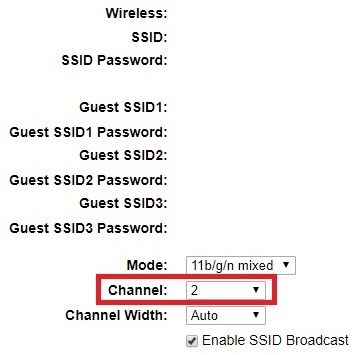
The easiest way to solve it is to just swap to another channel, even though routers have defaulted to Auto-Switching, they aren’t smart enough to do it on notice so manually adjusting them when you feel a sharp decrease in speed or packet loss is always the best time to do it. While some may argue that channels 1, 6, and 11 have bigger bandwidths, it is better to choose the one with the least traffic.
First off, use whatever WiFi Analyzer on your device and see which channel is the least used (Channel 3 for this case).

Next, proceed to access your router’s IP. This step a bit more advanced but highly recommended to do. For us, the IP address is 192.168.1.254 for the router model Archer C5v. Using a browser and log it in (Maxis login credentials default to “user” for username and password).

Select 1 of the 2 available frequencies and you will notice a Channel list for you to choose from. Select the one which is the best according to the analyzer app.
 2. Dead Zones


Due to how each and every house is different in design, hollow parts between walls or ceilings are filled in order to gain stability for holding higher floors or the entire unit in general. When these fillings are thick enough to block most of the signal’s energy, users on the other side will experience frequent disconnections or low surfing speeds.
Try reseating the residential gateway a.k.a the router to either face another direction or move it to another room where signals could get through the dead zones to reach the other side. If you have money to spend, consider running signal repeaters or mesh networks to solve this problem if cables or ports are unremovable due to constraints.
Maybe it’s time to invest in a WiFi repeater.
3. Begone, obstructions
WiFi signals are a form of electromagnetic wave – or EM wave for short. Any metal in between your WiFi router’s antennas and your device will cause issues. For example, a friend of mine had WiFi issues because his desk was behind the living room TV. That TV has a large metal plate inside it, and that plate blocked his WiFi signal.
4. Have you tried turning it off and on again?

Even though an obvious but sometimes reliable solution, it actually makes sense due to how updates are delivered to your home internet devices.
Usually, there will be a LED that flashes when updates are available and in process. On the other hand, certain components will reset back to the default state when they are restarted where there are few reasons that cause it to go haywire in the first place.
One of my past experiences is that random internet disconnections are fixed by restarting and receiving firmware updates while the other is the “supposed” delay of upgrading internet speed plans that will only be triggered when you cold reboot the modem and gateway.
Final Thoughts
With WiFi-6 products entering the consumer market promising ultra-high speeds rivaling ethernet cables and smart management of parameters, manufacturers are trying their best to cater user experience as best as they could for non-tech savvy users while growing performance to accommodate increased demand over time.
We have tried WiFi-6 previously, but that’s not today’s point.
What’s having my attention now is when will Li-Fi that runs within LED light bulbs and uses light beams instead of dedicated hardware gets adopted and mainstreamed in Malaysia. It is an interesting topic that rarely gets the spotlight which we may cover it if the opportunity arises.
For the time being, learn these tips provided by us so you don’t need to bother the next technician for half an hour just to do the same thing over the phone.
Like our Facebook Page here at NasiLemakTech.com for more news and in-depth reviews! Also, join our Facebook Group for insightful information and memes!
Subscribe to our YouTube channel too!

