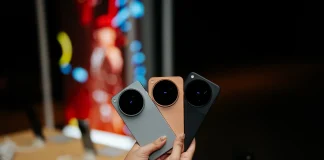
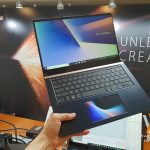
Dual-screens on a laptop with no additional hinges or fancy components? That’s pretty unheard of – but that’s what ASUS has delivered with their new ZenBook Pro with ScreenPad. It comes in both 14-inch and 15-inch variants as well.
ScreenPad
Let’s begin by talking about the ScreenPad first. It’s actually a full 5.5-inch 16:9 screen with 1920×1080 resolution and a matte finishing. Looks and feels like a smartphone screen, and can function like an external monitor. This is actually very useful, actually.

It can also have its own wallpaper and able to run a bunch of apps like audio player. Other than that, it can also adapt to whatever is on your main screen. If you’re watching a YouTube video, it’ll change to a YouTube video controller with play/pause, volume, seek bar, and also a button to skip ads. If you’re on Microsoft’s Office suite of software, it changes to something like font size changer.
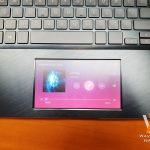
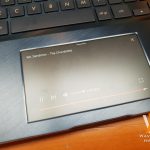

Currently, these apps are supported in the ScreenPad:
- ScreenPad Toolbar
- ScreenPad Launcher
- ScreenPad Office (Word/Excel/PowerPoint)
- ScreenPad Numkey
- ScreenPad Calendar
- ScreenPad Music Player
- ScreenPad Online Video player
- ScreenPad Calculator
- ScreenPad for Spotify
- ScreenPad Handwriting
- ASUS Sync
- ASUS SpeechTyper
- Adobe reader Digital Signature
There’s also ASUS App Sync that is able to sync it up to your phone calls, notifications, and phone mirroring. It can support all Android smartphones running Android 7.0 and up.
The ScreenPad is found in both the new ZenBook Pro 15 and ZenBook Pro 14.
ZenBook Pro 15
The all-powerful, all-conquering ZenBook Pro 15, a creator PC designed for the pros and content creators. ZenBook Pro 15 is faster and more sophisticated than ever before, with the jaw-dropping new ScreenPad that adapts to your needs for effortless control and enhanced efficiency. Experience professional power with up to an Intel Core i9 6-Core CPU, NVIDIA GeForce GTX 1050 Ti GPU, 1TB PCIe SSD, Gigabit-class WiFi and Thunderbolt 3 ports, while enjoying immersive multimedia on its 4K UHD NanoEdge PANTONE Validated display and powerful Harmon Kardon certified audio.


| CPU | Intel® Core™ i9-8950HK processor
2.9GHz, 6 Cores with Turbo Boost (up to 4.5GHz) and 12MB cache Intel® Core™ i7-8750H processor 2.2GHz, 6 Cores with Turbo Boost (up to 4.1GHz) and 9MB cache Intel® Core™ i5-8300H processor 2.3GHz, 6 Cores with Turbo Boost (up to 4.0GHz) and 8MB cache |
| Display | 15.6” LED-backlit 4K UHD (3840 x 2160) 16:9 touchscreen, color calibration:
Delta E<2, 100% Adobe RGB color gamut 15.6” LED-backlit Full HD (1920 x 1080) 16:9 (touchscreen optional), color calibration: Delta E<3, 100% sRGB color gamut Pantone validated 7.3mm-thin bezel with 83% screen-to-body ratio 178° wide-view technology ASUS Eye Care technology for up to 30% blue-light reduction |
| Operating system | Windows 10 Pro (ASUS recommends Windows 10 Pro)
Windows 10 Home |
| Graphics | NVIDIA® GeForce® GTX 1050 Ti/ 1050
Video memory: 4GB GDDR5 VRAM |
| Main memory | 8GB / 16GB 2400MHz DDR4 onboard |
| Storage | 1TB / 512GB PCIe® SSD
512GB / 256GB SATA3 SSD |
| Connectivity | Wi-Fi
Dual-band 802.11ac gigabit-class Wi-Fi Bluetooth® Bluetooth 5.0 |
| Camera | VGA webcam |
| I/O ports | 2 x Type-C™ USB 3.1 Gen 2 (Thunderbolt™ 3)
2 x Type-A USB 3.1 Gen 2 1 x HDMI 1 x Combo audio jack 1 x MicroSD card reader |
| Audio | ASUS SonicMaster stereo audio system with surround-sound; smart amplifier for maximum audio performance
Array microphone with Cortana voice-recognition support 3.5mm headphone jack Long-travel voice coils for improved low-frequency response Certified by Harman Kardon |
| Keyboard &
ScreenPad |
Keyboard
Full-size backlit, with 1.5mm key travel Fingerprint sensor supporting Windows Hello ScreenPad 5.5″ FHD (1920 x 1080) Super IPS+ display 178˚ wide-view technology Glass-covered for fingerprint and smudge resistance Precision touchpad (PTP) technology supports up to four-finger smart gestures |
| Security | Fingerprint sensor for Windows hello |
| Battery | Up to 9.5 hours battery life*
71Wh 8-cell lithium-polymer battery
*Battery tests conducted by ASUS in August 2016 using the MobileMark® 2014 Office Productivity scenario. Test configuration: ZenBook Pro 15 UX580GDX, Intel® Core™ i5- 8300H, 512GB SSD, 16GB RAM. Test settings: Wi-Fi enabled, display brightness set to 60%, battery saving mode. Actual battery life may vary depending on product configuration, usage, operational conditions and power management settings. Battery life will decrease over the lifetime of the battery. |
| AC adapter | 150W power adapter
(Output: 19.5V DC, 7.7A, 150W) (Input: 100-240V AC, 50/60Hz universal) |
| Dimension(W x L x H) | 36.5 x 24.1 x 1.89 |
| Weight | 1.88kg/4.1lbs
2.01kg/4.4lbs (touch screen) |
In case you’re wondering how well it scored, the ZenBook Pro 15 can actually cool the Core i9 to quite a good degree – literally. from my quick test in Prime95 with small FFT, two of the 6 cores hit thermal throttle and the package die hits 96ºC. However, the fans are really silent. With that said, the ZenBook Pro 15 actually hits slightly above 1000cb.

The ASUS ZenBook Pro 15 will be available in July 2018 worldwide with the price of USD $1,299 to $2,299.
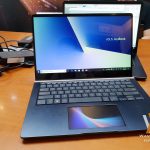
ZenBook Pro 14
The new ZenBook Pro 14 introduces the futuristic new ScreenPad to interact with your laptop. ScreenPad cleverly combines a touchpad with a full HD touchscreen to offer novel ways of interacting intelligently with both Windows apps and dedicated programs called ScreenPad Apps. ScreenPad is fully customizable to allow users to personalize their experience. ZenBook Pro 14 incorporates the unique ASUS ErgoLift hinge for more comfortable typing. Powered by up to the latest Intel Core i7 processor and NVIDIA GeForce GTX 1050 MAX-Q graphics, ZenBook Pro 14 will also include support for Intel Optane memory, an infrared camera for facial recognition and built-in support for Amazon Alexa voice-powered services. Amazon Alexa support varies by countries and regions. US will have Alexa-enabled ZenBook S available in late 2018.



| CPU | Intel® Core™ i7 processor
Intel® Core™ i5 processor |
| Display | 14” LED-backlit Full HD (1920 x 1080) 16:9 touchscreen, 100% sRGB color
gamut 5.2mm-thin bezel with 83% screen-to-body ratio 178° wide-view technology ASUS Eye Care technology for up to 30% blue-light reduction |
| Operating system | Windows 10 Pro (ASUS recommends Windows 10 Pro)
Windows 10 Home |
| Graphics | NVIDIA® GeForce® 1050 Max-Q
Video memory: 2GB/4GB GDDR5 VRAM |
| Main memory | 8GB / 12GB / 16GB 2400MHz DDR4 |
| Storage | Intel® Optane™ memory
1TB 5400RPM SATA III HDD 128GB / 256GB SATA III SSD 256GB / 512GB PCIe x2 SSD 1TB PCIe x4 SSD |
| Connectivity | Wi-Fi
Dual-band 802.11ac gigabit-class Wi-Fi Bluetooth® Bluetooth 5.0 |
| Camera | IR webcam |
| I/O ports | 1 x Type C USB 3.1 Gen2
1 x Type A USB 3.1 Gen2 1 x USB 2.0 1 x Standard HDMI 1 x Combo audio jack |
| Audio | ASUS SonicMaster stereo audio system with surround-sound; smart amplifier for maximum audio performance
Array microphone with Cortana and Alexa voice-recognition support 3.5mm headphone jack Long-travel voice coils for improved low-frequency response Certified by Harman Kardon |
| Keyboard &
ScreenPad |
Keyboard
Full-size backlit, with 1.4mm key travel IR camera supporting Windows Hello ScreenPad 5.5″” FHD (1920 x 1080) Super IPS+ display 178˚ wide-view technology Glass-covered for fingerprint and smudge resistance Precision touchpad (PTP) technology supports up to four-finger smart gesture |
| Security | |
| Battery | 70Wh 4-cell lithium-polymer battery |
| AC adapter | 90W power adapter
(Output: 19V DC, 7.7A, 90W) (Input: 100-240V AC, 50/60Hz universal) |
| Dimension(W x L x H) | 323 x 225 x 17.9mm |
| weight | 1.6kg |
The ASUS ZenBook Pro 14 will be available worldwide starting August 2018 with the price range of USD $949 to $1,499.

Like our Facebook Page here at NasiLemakTech.com for more news and in-depth reviews! Also, join our Facebook Group for insightful information and memes!
Subscribe to our YouTube channel too!