




















If you are staring at an iPad screen restricted by Remote Management, you need a way to regain full access. Mobile Device Management (MDM) is a great tool for organizations, but it becomes a major headache if you have bought a used device or left a school or company. You can bypass MDM on iPad using a few simple, beginner-friendly methods, starting with the official settings if you have the right credentials.
What is MDM and Why Remove It?
MDM stands for Mobile Device Management, a system allowing administrators to control, track, and restrict your iPad remotely. While helpful for institutions, these restrictions prevent you from fully owning and customizing your device once you leave the organization.
- A common reason to remove MDM from an iPad includes purchasing a refurbished device that is still locked to a previous owner’s company.
- You might also need to disable a school management profile on your iPad after graduating.
- Removing the profile ensures you can finally download your own apps and change basic settings without interference.
How to Unlock iPad from Remote Management via Settings
If you know the login details or can contact the IT administrator, this is the easiest official route. Removing the profile directly from your device settings permanently frees the iPad without requiring third-party software.
- Navigate to your iPad’s Settings, tap on General, and look for VPN & Device Management.
- Select the management profile currently installed on the device.
- Tap Remove Management and enter the correct administrator password to free your device.
iPad Remote Management Removal Without Password
If you do not have the IT credentials, Tenorshare 4uKey is the most effective tool for iPad remote management removal without a password. Designed specifically for beginners, it allows you to bypass the MDM lock screen on iPad in just a few clicks without requiring any technical knowledge.
- This method is perfect for second-hand device buyers who are locked out of the setup screen.
- Keep in mind that while this tool bypasses the restriction so you can use the iPad normally, resetting the device in the future may prompt the lock screen again.
- Bypass MDM without a username or password.
- One-click iPhone and iPad passcode unlocking.
- Broad iPhone, iPad, iPod, and iOS/iPadOS compatibility.
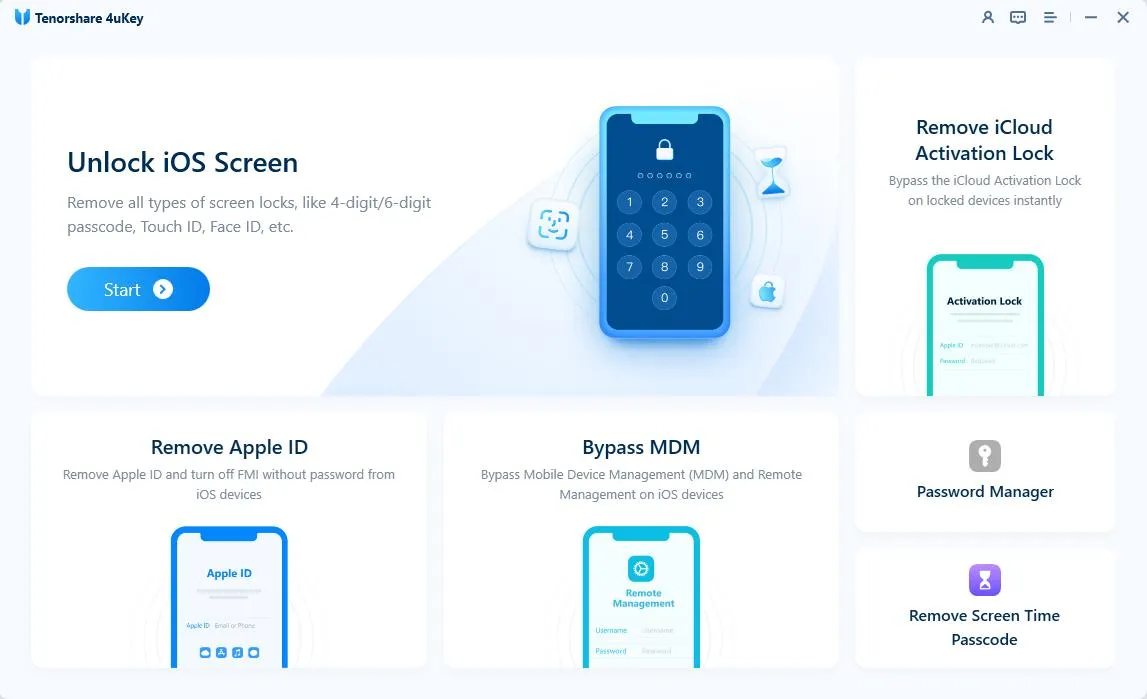
Step 1: Download and install 4uKey.
Open the program on your computer. Click “Bypass MDM” on the main screen to begin.
Step 2: Connect your iPhone to the computer.
Use a USB cable to connect your iPhone, iPad, or iPod Touch to the computer. Unlock your device screen and tap the prompt to trust the computer.
Step 3: Start the MDM bypass.
Wait for the software to recognize your device. Make sure Find My iPhone is turned off in your settings, then click the “Start” button.
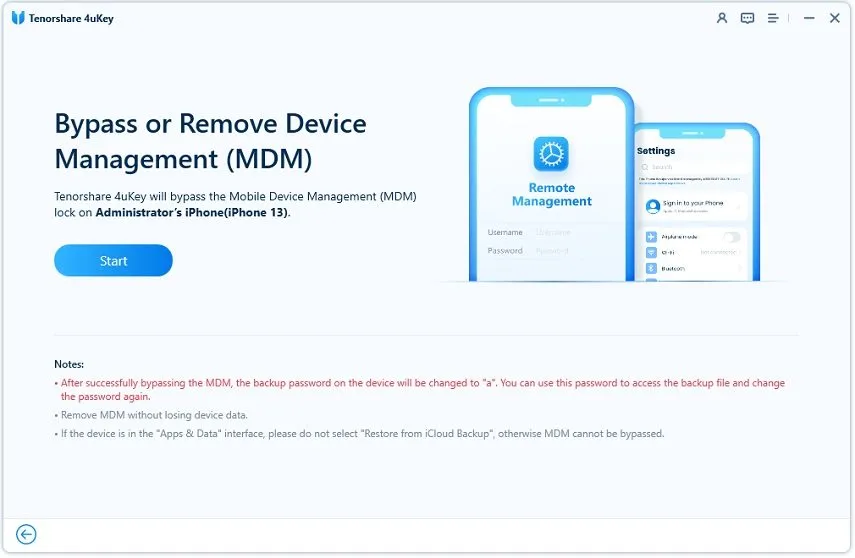
The tool will now work on the Remote Management lock. Keep your device connected until it finishes.
Step 4: Wait for the process to finish.
Your device will restart once the MDM lock is gone. You can then set up your phone normally.
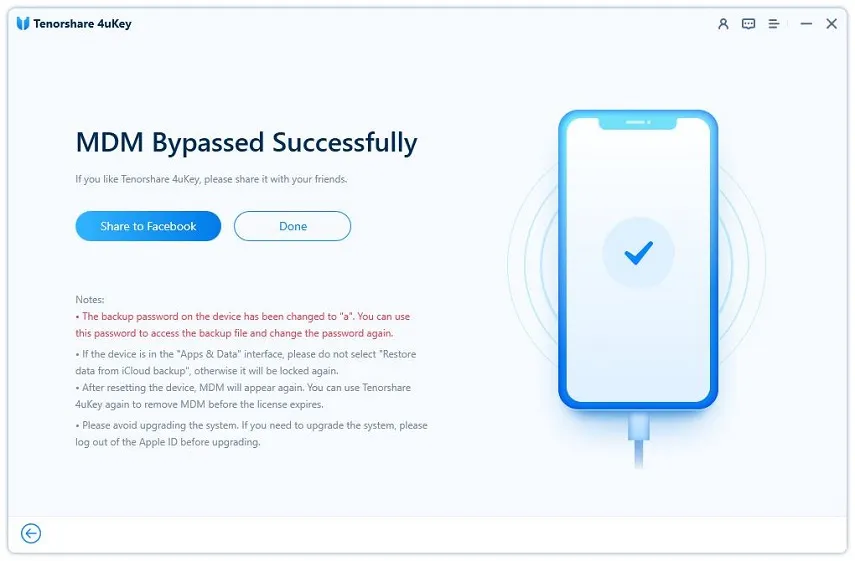
Note: The Mobile Device Management lock will return if you factory reset the device or update the software. You can use 4uKey to bypass it again.
Can You Factory Reset an iPad with an MDM Lock?
Many users wonder if they can simply factory reset an iPad with an MDM lock using iTunes or Finder. While placing your iPad in Recovery Mode and restoring it will wipe all current data, it usually does not permanently remove the MDM configuration.
- Because the device serial number is registered in Apple’s servers, the remote management screen will likely reappear as soon as the iPad connects to Wi-Fi during the initial setup.
- This makes a factory reset an incomplete solution unless combined with a dedicated bypass tool.
Final Thoughts
Bypassing an MDM lock does not have to be a stressful, highly technical process. If you have the right passwords, a quick trip to your Settings app will solve the problem instantly. For those stuck with a second-hand lock, specialized tools provide a fast, beginner-friendly way to regain full access to your iPad.
Frequently Asked Questions About iPad MDM Bypass
Q: Does bypassing MDM delete the data on my iPad?
A: If you remove the profile via Settings with the correct password, it does not delete your personal data. However, using third-party bypass tools on a locked setup screen often requires a fresh start, which means existing data may be wiped.
Q: Will the remote management lock return if I update my iOS software?
A: If you officially removed the profile via Settings, it will not return. If you used a bypass tool, updating the iOS software or performing a factory reset will usually cause the MDM lock to reappear, requiring you to run the bypass process again.
Q: Can a jailbreak permanently remove the MDM profile?
A: Jailbreaking can sometimes hide or disable the MDM profile temporarily, but it does not permanently remove the serial number registration from Apple’s servers. Additionally, jailbreaking introduces security risks and can void your warranty.
Q: Is it legal to bypass remote management on an iPad I bought?
A: Yes, it is legal to bypass remote management on a device you legally own, such as a refurbished iPad you purchased. However, you should not bypass MDM on a device that still belongs to a company, school, or another individual.
Like our Facebook Page here at NasiLemakTech.com for more news and in-depth reviews! Also, join our Facebook Group for insightful information and memes!
Subscribe to our YouTube channel too!

