




















The modern workforce is mostly looking at our screens for most of our time. That’s why eye comfort is important and BenQ has something for us – the new BenQ GW3290QT monitor.
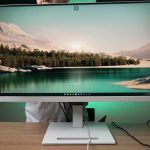
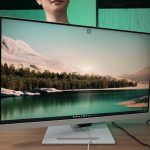
This monitor comes with all of the exclusive BenQ features that are made to ensure our eyes get all of the comfort that it needs, while looking simple and clean with its full white design at the same time. This unassuming aesthetics can actually make it blend with the environment very well.

This BenQ monitor comes in two sizes – there is a 27-inch version with the model number GW2790QT and the one we have here is the bigger 32-inch GW3290QT. Both of them have the same resolution of 1440p, which is the sweet spot for visual clarity. 1440p resolution is also more affordable compared to a 4K monitor.

The main highlight of this monitor is the Coding Mode color profile that is specifically tuned for those who are programming using Integrated Development Environment (IDE for short). Basically every single programmer uses an IDE. I used to work in some basic programming – and staring at those codes for hours is painful for my eyes. What this Coding Mode does is change the color profile to ensure those colors coming from an IDE looks pleasing to our eyes. Oh – this monitor also has flicker-free technology, further enhancing our eye comfort.


But even if it is more pleasing to our eyes, the long-term effects will still cause dry eyes and eye strain. That’s why there’s something called the BenQ Eye-CareU suite of software.


We can configure the Low Blue Light Plus in a few different levels, and this can also be applied to all color profiles. Presets like Coding Mode already automatically applies the maximum level of Low Blue Light Plus for us.

Then, there is also a Distance Reminder so we wouldn’t get too focused on coding until we forgot to take care of our posture, few different levels of break reminders ranging from a memo to just locking us from doing anything, forcing us to take a break.


You may have also realized this chin at the bottom of the monitor. It houses the proximity sensor that is used for the aforementioned Distance Reminder feature, and it also has an ambient light sensor for the Brightness Intelligence feature. It will adapt to the brightness level in accordance to the surrounding, so that the screen brightness won’t be too bright or too dim.

One thing that I really like about this monitor is this cluster of I/O ports. We have an audio jack, a USB-A port, and another USB-C port. These ports are made for easy access – and I think they’re great.

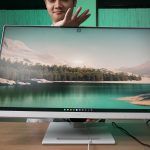
In terms of ergonomics, this GW3290QT has everything that you could ask for. It has height adjustment, tilt, swivel, and also pivot. Because of how this monitor is made, it also minimizes glare and reflections so we can position it to the most comfortable angle for us.
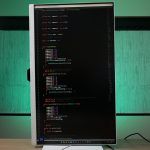
This monitor can be used in vertical view so we can look at a longer list of codes in a single view.

So, let’s take this to the next level. At the back of this monitor, we have all of these ports. We can plug in our keyboard and mouse into these two USB-A ports, and plug in the USB-C cable to our laptop. We can charge our laptop at 65W of power and also have display output alongside the keyboard and mouse at the same time – but that’s not all.

See this port? We can plug in another DisplayPort cable from this monitor into another monitor to daisy-chain. This means, we can plug in that one single USB-C port into a laptop and we have 3 screens to use while we charge the laptop at the same time. This is an amazing feature to have.


But, that’s not all. This monitor even has a feature called the Noise Filter Speaker & Noise Canceling. It has a built-in microphone with noise-cancellation feature.
And there’s also speakers built into the speaker with noise cancellation too. It doesn’t matter how noisy your other participant’s environment is, it will filter it for you.
All of the demonstrations of the noise-cancelling features are included in our video at the top of this review, so check that out.
Should you buy the BenQ GW3290QT monitor?
In summary, if you want a monitor that is great for your eye comfort while coding, then I implore you to look at the BenQ GW3290QT monitor. Other than the Coding Mode, it has advanced eye care technologies, seamless connectivity with just one USB-C cable, ergonomic design, and enhanced communication capabilities into one sleek monitor that is unassuming. If you’re interested, check out all the links down below.
For more information
Like our Facebook Page here at NasiLemakTech.com for more news and in-depth reviews! Also, join our Facebook Group for insightful information and memes!
Subscribe to our YouTube channel too!

