





















When it comes to smartphones, we’ve always been seeing the same price ranges and genres of devices offered. We have one high-end smartphone that has a stylus in the market, but that’s out of many people’s league. What if we tell you that there is indeed an alternative now, and that smartphone is called the Infinix NOTE4 PRO?
Let’s take a deep dive and have a look at what the Infinix NOTE4 PRO has to offer. Also, we have the XPen and Smart Cover flip case with us so that we can provide a complete user experience review to you. The XPen is the stylus that Infinix has developed for the NOTE4 PRO.
The XPen + Smart Cover combo is sold separately, so we’ll review it as an add-on to the Infinix NOTE4 Pro.

Unboxing
Alright, so right here we have a total of two boxes – one for the XPen stylus and the Smart Cover flip case, and another box for the Infinix NOTE4 PRO itself. Let’s open the latter first.

The Infinix NOTE4 PRO box itself is held by a sleeve and sealed with a sticker. Pretty simple when it comes to smartphone packaging, right? No, not really.

Sliding off the sleeve reveals the Infinix NOTE4 PRO itself sitting on a pedestal snugly – but that’s it. Flip the box over and there I saw it – there’s another seal around the side. I opened that seal and the lid swivels open, revealing all the accessories and paperwork.
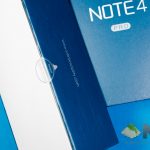

The slew of accessories here are rather typical for a smartphone, so there’s nothing special right here. One thing that made me chuckle is how the pair of earphones is wrapped together like a mummy.

So, for the Infinix NOTE4 PRO itself you do get the usual accessories – documentation, USB cable, charger, earphones but without changeable eartip sizes, the phone itself, and also a film screen protector.

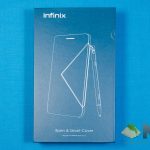
As for the XPen and Smart Cover flip case, they’re both packaged in a single box together. Opening up the box reveals the XPen sitting snugly on the left side and the Smart Cover is on the other side. Why are these both items packaged together? There’s a reason, actually. More on this later.


[nextpage title=”Design”]
From the front, the Infinix NOTE4 PRO looks rather typical for a smartphone. Though, the coldness from its aluminium body will tell the build quality is actually pretty solid. Much better than I would expect from a smartphone of this price.

Surprisingly, I realize one thing in particular after lifting the Infinix NOTE4 PRO out of the box – its weight. It’s rather heavy, to say the least. Weighing in at 210 grams, it’s one of the heaviest phones that we’ve tested thus far.

To be honest, the weight of the Infinix NOTE4 PRO is a good initial indicator – at least to me. Its weight is reassuring when it comes to the integrity, and it definitely feels premium with a nice finish on the back.
However, when it comes to the XPen and Smart Cover, there’s only one reaction when everyone saw it – and the reaction is “why is the phone so wide?” Then I have to go about explaining that only the case itself is wide, not the phone.

The Smart Cover serves as a holder for the XPen too. That might be the reason why the Infinix NOTE4 PRO can have such a large battery, too. However, for some reason, the pen needs charging – and that’s what those 3 golden circles are for. They’re pogo pins to charge your XPen.
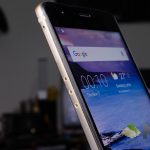

With the XPen and Smart Cover, the weight goes up to 291 grams.

[nextpage title=”Connectivity & Buttons”]
In terms of connectivity, the Infinix NOTE4 PRO is actually doing quite well for a budget-oriented smartphone. It doesn’t have NFC or any of those fancy connectivity, but it does get the basics right.

It has two dedicated card trays – one for two micro-SIM cards, and another one dedicated to the microSD card. Great job from Infinix!

It does have 5GHz WiFi, unlike the current ZenFone 4 series of smartphones that only has 2.4GHz only. Again, not a big issue – just that it’s nice to have, as the network wouldn’t get congested.

The one major complaint that I have is the home button and the two capacitive keys beside it. First of all, the home button doubles as a fingerprint scanner and a physical home button. It looks and feels like it can’t be pressed, but it can actually be pressed. Needs a little more force, and it seems to snag up with the chassis itself.
Secondly, the capacitive keys aren’t backlit, and they’re just two small dots. These two dots are difficult to press. Furthermore, with this type of design, I automatically assumed that the back and multitask button can be swapped via software. But that’s not the case. More on that later.

Both the volume rocker and power button are positioned on the right side. The power button is heavily textured so you can feel it with your fingertips.
[nextpage title=”Display”]
This is one part that I’m surprised with. The Infinix NOTE4 PRO comes with a 5.7-inch IPS LCD screen with 1080p resolution. That might not be such a great big feat for smartphones these days, but for the price of the Infinix NOTE4 PRO, it’s something worth highlighting.

Colors are okay, though the white balance is a little off to the blueish side. In terms of brightness, it can go really bright, too. It looks great indoors and outdoors, and the coating on the glass makes it that much more enjoyable to use out of the box. I mean, there are “premium smartphones” like the Huawei P10 that doesn’t have an oleophobic coating and literally made it impossible to swipe frictionlessly right out of the box.

And let’s not forget about the Smart Cover. The Smart Cover has a tinted triangular acrylic window that peeks into some status information like time, day, date, notification, and battery level. Pretty neat, and there are two shortcuts on the top and bottom side too.

It’s reminiscent of the older days where smartphones interact with the flip case to show off some other menus. Infinix managed to pull it off with their Smart Cover, which I think is quite a nice feature to have – but there is no option to disable this feature.

One thing to take note of this triangular window is that since it’s made out of acrylic, scratches can happen easily.
[nextpage title=”Camera”]
Let’s talk about the camera. I have quite a lot to say about it. First of all, here’s a quick list of specs.
- 13MP rear-facing camera with f/2.0 lens
- 8MP front-facing camera with f/2.0 lens
Now, time for the rear and front-facing camera in-depth review.
Rear-facing camera

Now, the Infinix NOTE4 PRO takes some pretty okay shots with its rear camera. Though, exposure wise it’s a little off at certain times. Using auto mode, both indoor and outdoor shots were noisy. However, I tried to use manual mode to take some outdoor shots and that’s when I realized the camera UI, UX, and functionality is pretty abysmal.
More on that later – but first, some rear-camera picture samples.


Selfie camera

I’m not much of a selfie fan, and I took a random selfie in my room to test. For all I can say, the selfie camera is actually of acceptable quality for social media.
The camera app itself
Like what was mentioned earlier, the app itself is abysmal when it comes to manual mode. The ring-like UI to select between metering mode, shutter speed, ISO, exposure, white balance, and focus.

That wheel itself is not really responsive, thus making the UI frustrating to use.
To add more fuel to the flame, the manual mode is very limited. First of all, I took the picture of the TM Tower using auto mode, thinking that I should be able to get a better quality if I use manual mode.

So I tried, and I got over-exposed images every time I tried to take the picture. Why? Because the manual mode’s shutter speed can only go 1/100 second at most. However, upon further inspection of the same picture taken using auto mode, the shutter speed went all the way to 1/696 second.
The image below is taken in auto mode, whereas the image above is taken in manual mode. You can click on the pictures and check out the metadata over at Flickr.

Needless to say, I’m baffled.
[nextpage title=”Software”]
It’s no surprise that Infinix NOTE4 PRO is still a rather new smartphone company. With their own flavor of Android called XOS, it’s actually pretty heavily themed.
There’s a custom theme engine that Infinix has implemented which is quite inclusive in terms of user experience – it changes the icons, fonts, wallpapers, and some color accents throughout the UI. Though there is no option to download and use custom icon packs or fonts.

The main gripe I have about the Infinix NOTE4 PRO’s XOS is the amount of bloatware. Infinix themselves have a suite of apps which have the prefix character of X – so all of their apps will be named like XNote, XShare, and XAccount – just to name a few. But then there was other bloatware as well – and these apps can’t be removed.

Of course, there is one positive note about the Infinix NOTE4 PRO’s XOS – and that’s the Multi Account app. As the name implies, this app lets you clone your existing app so you may have two different instances running at the same time. Double WhatsApp, double Telegram, and even double Facebook accounts.

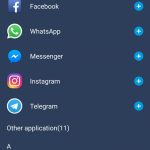
Though, I’m not sure why Infinix chose to separate it to another app instead of integrating it to the settings menu.
The XPen and Smart Cover does offer a few other extras when it comes to software too. As aforementioned, the Smart Cover’s triangular cutout does offer two little shortcuts which can’t be changed. It can only launch the music player or turn on the flash.

Other than that, the little triangular cutout does show notifications, though you can only dismiss notifications.
The sensitivity of the XPen is pretty alright, although the palm rejection still needs a little bit of refinement.

[nextpage title=”Performance”]
Let’s start with the specs. The Infinix NOTE4 PRO comes with this list of specs.
- 1920×1080 resolution
- MediaTek MT6753 chipset manufactured at 28nm
- 8x Cortex-A53 processor @ 1.3GHz
- 3GB RAM
- 32GB storage
For the price that Infinix is asking for the NOTE4 PRO, the performance is pretty average, so say the least. The hardware used here is not really meant for 1080p gaming at all – as shown on Epic Citadel. As for day-to-day use, it does feel a little sluggish. This might be due to the lack of optimization on the software part.
Whichever the case may be, here are the scores for the benchmarks.


As for what I can tell throughout my entire time with the Infinix NOTE4 PRO, expect some sluggishness in Chrome browser. Though, I think that as time goes by, Infinix can definitely squeeze out a smoother experience through software optimization and giving the option to remove their built-in suite of apps outright.
[nextpage title=”Battery & Charger”]
The Infinix NOTE4 PRO comes with a pretty generously large battery – 4,500mAh. I’d say that anything larger than the magical three thousand is pretty rare these days.
However, that 4,500mAh battery is a little underwhelming throughout my test. Again, that might be due to the fact that the chipset itself is not meant for this resolution. Also, the chipset is a little old at this point of time. Also, the chipset of manufactured using 2D transistor technology – not 3D, or FinFET.
Learn more about why and how FinFET helps in terms of battery life here.

Lasting for about 9 hours means it’s about average battery life in our tests. Upon days with heavier usages, the battery wouldn’t make it to the end of the day.
Charger
I’m surprised that Infinix developed their own proprietary fast charging technology called XCharge – apparently, it’s XCharge 4.0 now. It’s capable of outputting a maximum of 5V at 5A, making it a 25W charger – faster than OPPO’s VOOC and it has the same maximum output as Huawei’s SuperCharger.

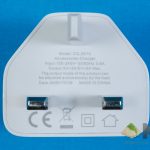
While the USB cable headers for OPPO is dark green and is dark purple USB-C cable, the Infinix NOTE4 PRO has a lime green cable header instead.

Its charging speed is actually pretty impressive, as it can reach 50% of charge in nearly 50 minutes, and let’s not forget that it has a large 4,500mAh battery in it. Even the ASUS ZenFone 3 doesn’t have fast charging.

[nextpage title=”Wrapping up the Infinix NOTE4 Pro review”]
Let me summarize by saying this – the Infinix NOTE4 Pro gave me a good first impression because of its packaging layout and its build quality. Infinix has the potential to create a great budget-oriented smartphone, especially one with a stylus. Hardware is pretty decent, too.

However, not everything is sunshine and rainbow about the Infinix NOTE4 Pro. As we’ve mentioned earlier, the software here is definitely an issue. There are lots of improvement to be made for the OS overall to improve the user experience – especially the navigation keys. Also, the home button will need some modification. Perhaps the next Infinix NOTE phone will have a 2:1 display and move the fingerprint scanner to the back? Though, that means the XPen and Smart Cover will need some redesigning.
Overall, for the price of RM999 for the Infinix NOTE4 PRO smartphone (available in gold or black color) alone and another RM300 for the XPen and Smart Cover. I find that the Infinix NOTE4 PRO smartphone itself is a pretty good, but once coupled with the XPen and Smart Cover, some improvements will definitely have to be made before we can recommend the full package.
With that said, you can now buy the Infinix NOTE4 PRO together with the XPen and Smart Cover for just RM999 at Lazada as they’re having a promotion right now. At least you can take out the Smart Cover if you don’t like it – but you’ll lose a proper place to hold and charge the XPen.
Like our Facebook Page here at NasiLemakTech.com for more news and in-depth reviews! Also, join our Facebook Group for insightful information and memes!
Subscribe to our YouTube channel too!

