




















Here is Xiaomi’s first-ever true smartwatch that uses Google’s WearOS 3.5! I am very happy that we’re getting more smartwatch brands in the market but is this watch actually good and should you buy it? I’ll answer those two questions in this review – and I highly recommend you watch the video since many things are shown in motion.
When we unbox the watch, we’ll get the watch and also the charging cable. Nothing else is worth paying attention to.
The watch itself is using a fairly simple design. Xiaomi says that it is using a 46mm dial – which is surprisingly just a tad smaller than the bigger Galaxy Watch 6 Classic 47mm – and the bezel is also rather small.

This watch has a 1.43-inch AMOLED screen with 466×466 pixels. It’s a beautiful screen and I don’t have any major issues with it. The one annoyance that I have is the auto brightness. Whenever I’m indoors, somehow the auto brightness is just dimmer than what I would have preferred. I can’t set a brightness offset since that feature is just unavailable on this watch. Not a big deal, but it’s something to point out.

The bezel is also flat enough that swiping the edges is comfortable. Unfortunately, this watch does not have any rotating bezels or a pseudo-rotating bezel by swiping around the edge.

What it does have though, is a rotating crown at the side. Now, I thought this rotating crown is a replacement for not having the rotating bezel – but that’s not the case. The rotating bezel does not work for the home screen widgets. We’ll have to swipe with our finger. Why? I don’t know – but it works on any other menus though.
Pressing the crown will show the list of apps and the app list is definitely familiar with some other smartwatch’s interface, hehehe. And hey – scrolling around the device is really, really smooth. I didn’t have any hiccups.


The top button is configurable to launch whatever app you want upon a single press – so I just set it to launch Google Wallet because why not? For the Google Assistant shortcut, you can either have it to show up by holding the crown button, or the button at the bottom. If you use press the bottom button once, it’ll re-launch your most recent app. If you press and hold it down long enough, it’ll also double as a power button.

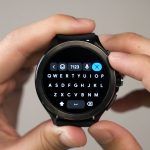
What about the software features? Well, they’re pretty standard for a Google WearOS 3.5 smartwatch. Xiaomi did include its own flavor in the interface too. We can swipe down to see all the notifications, then reply to any messages that we want by bringing up the Gboard keyboard – really nice, or swipe up to access the 3×3 grid of quick settings tiles.
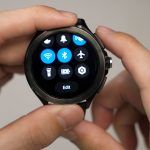
Since this is a Xiaomi product with Xiaomi’s own spin on the software, there are obviously going to be some issues. There is a weird behavior that I really want Xiaomi to address. You see, one feature that I always use is Do Not Disturb. For this watch, we can swipe up, press that crescent moon icon and we can even set it to DND for X hours.

It will sync with the phone’s DND – if that feature works, that is. I can’t get it to work with my phone.

I also discovered one more weird behavior. I schedule my phone to go into DND mode at 10pm every day – and since this watch has a DND sync feature, I expect it to sync with the watch. But as mentioned earlier, it doesn’t sync with my phone. That’s okay, since the watch has its own schedule DND mode – I’ll just set it to use the exact same settings as my phone.

But once I set the schedule, I cannot use the “turn on DND for X amount of time” feature. If i turn on that feature, then it’ll turn off my scheduled DND. You can literally see it turn off the scheduled DND on its own! What gives?!

Other than that though, everything else is to be expected from this watch. I turned on all the health-tracking features and this watch is rather featureful, to be honest.

There are also lots of built-in watchfaces but most of them look boomer AF. So, I just tapped on the “more” button and that leads me to the Google Play Store. Of course, I installed Facer and Timeflik and started to explore the thousands of watchfaces available – or make my own animated watchface. Eventually, I downloaded this one because of its vibrant colors.

I also downloaded Spotify because why not? It’s a WearOS 3.5 smartwatch and we can do a lot of things with it.

Okay, now let’s talk about the battery life. True smartwatches don’t have good battery life – and I just live with that fact. The Xiaomi Watch 2 Pro can last for about 24 hours which is decent. I usually charge it at around 8pm and then wear it to sleep. The next day, I’ll charge it at 8pm again with about 20% battery left. So I’ll say, plan out your day if you don’t want to wear a black circular bracelet on your hand.

Now, the charger that comes in the box is a USB-A charger. That’s unfortunate since everything is moving to USB-C. Also, Xiaomi’s website says that this is a magnetic charger and while it is magnetic, we can clearly see that there are two pogo pins on it. That technically means this watch only has wired charging – which is faster than wireless charging, but remember to be careful since those two exposed pins are exposed. If it gets dirty, oxidized, or has a layer of corrosion – yeah that’s a bad sign.

I also tried placing it on a wireless charging pad, but nothing happened. That means you’ll also need to carry the proprietary charger with you if you want to charge it mid-day. Rather unfortunate. At least Samsung’s watch can be charged with their own phone via Wireless Powershare.

Oh – let’s not forget about the strap width. Xiaomi’s website did not mention what’s the width but they do tell us the size. As in the wrist circumference size. It’s only visible on the strap itself that it says 22mm.

Should you buy the Xiaomi Watch 2 Pro?
So, for the price of RM1,199 – I do think that this is a very good smartwatch. Sure, there are some software issues here and there and if Xiaomi does fix them – this is a recommended purchase.

It is indeed more expensive than Samsung’s smartwatches but remember – this Xiaomi smartwatch has all of its features available on non-Xiaomi phones. I’m using the Galaxy Z Fold 5 with this smartwatch.
Samsung, despite having lower-priced smartwatches, has a lot more features that will only work if you pair it with a Samsung phone.
Where to buy? (Affiliate links)
Like our Facebook Page here at NasiLemakTech.com for more news and in-depth reviews! Also, join our Facebook Group for insightful information and memes!
Subscribe to our YouTube channel too!

