




















Since 2019, I was wearing the Samsung Galaxy Watch Active. It’s smart, sleek, and has a pretty decent battery life overall. I thoroughly enjoyed what the watch has to offer and now, I’m using it once again.
That watch still works fine after 2.5 years but as mentioned in our Galaxy Watch 4’s review, I am indeed looking to upgrade to the Galaxy Watch 4. And I did.
But why did I choose to upgrade to this generation of the Galaxy Watch 4 and not the previous Galaxy Watch 3 or the Galaxy Watch Active 2?
There are a few reasons, actually. The Galaxy Watch 3 is the most featureful when prior to the new Galaxy Watch 4, but I don’t like that spinning bezel because of bulk. The Galaxy Watch 2 Active has that look but I don’t think the upgrade from the Galaxy Watch Active is justifiable.
By the way, if you think that not having the spinning bezel means it’ll take a long time to swipe between pages – then don’t worry. You can swipe around the screen to simulate the rotating bezel. This works on the Galaxy Watch Active too – which was a new feature that was introduced a few months after its release.


That is why I settled down for the Galaxy Watch 4 – particularly the 44mm size. It has a bigger screen, better health tracking features, and comes with Wear OS now too.
Design difference
Now, looking at the watch itself, they’re both having this same design language. It’s sleek and doesn’t have a rotating bezel and there are two buttons to the right of the watch. Pretty standard – but the new buttons on the Galaxy Watch 4 series are so much easier to press.

One thing I find interesting is that the Galaxy Watch 4 has a flat glass covering its screen instead of the curved circumference on the Galaxy Watch Active. This means screen protectors can appear more seamless – especially if you buy glass ones.


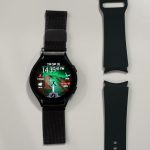
The size of the Galaxy Watch 4 that we got – as mentioned earlier – is the 44mm version and has a bigger screen with relatively small bezels. Interestingly, Samsung decided to go back to 20mm straps for the Galaxy Watch 4 series, so I can just take my Milanese loop from my Galaxy Watch Active and put it in the new Galaxy Watch 4.

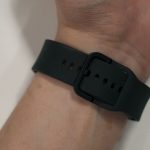
While I have praised the Galaxy Watch4 Classic’s strap for its genius mechanical design, the Galaxy Watch4’s strap is slightly different – particularly the way it buckles at the back of the wrist. It has to be tucked underneath itself which makes it extremely annoying to put in and take out.
Migrating watch faces from Tizen to Wear OS
Of course, the best upgrade here is the software side of things. Yes, the software in both watches look and feel identical but the Galaxy Watch 4 is now using Wear OS. Like what we mentioned in our original review of the Galaxy Watch 4 Classic, there’s really nothing that you can import from Tizen to Wear OS.

They are both using completely different app stores as Tizen relies on the Galaxy Store whereby the Wear OS uses the Google Play Store. That means all your watch faces cannot be brought over to the new watch.
But that’s not true. I can indeed import some watch faces over to the new Galaxy Watch 4 if my watch faces are from 3rd party services like Facer, Watch Maker, or Mr. Time.

I personally used Facer before on the Galaxy Watch Active, so I just installed the Facer app on my phone and the watch, and voila – my watch faces can now be used on the new Galaxy Watch 4 – but some watch faces do need a bit of touch-up since the Watch 4 has a higher resolution screen.
Watch faces from these 3rd party services can be directly applied to different watches if these watch face services like Facer can be installed.
Some more nuances with Wear OS
Also, there are a lot of nuanced differences between the two operating systems – Tizen and Wear OS. One thing I discovered is that when I was driving around while Google Maps is navigating my path, the watch kept vibrating. Then I realized that the watch vibrates to tell me that I need to perform some action like turning, and the watch shows me this.

This is a nice feature to have since it reminds me that I need to turn. It acts as a backup notification in case I didn’t hear what the voice assistant said.
More features overall
Since I am using a Samsung phone, I can track more health data like sleep and snoring, and also pair my Galaxy Buds Pro to the watch if I ever get too far from the phone.

And yes, I can install apps like Spotify or YouTube Music on the watch, then download and play music directly on the watch. This watch has a speaker and a microphone. While it’s definitely not meant for music listening, it’s perfectly fine for calls. Maybe not in public since it will be noisy as people will call me James Bond.


Samsung had already packed a lot of features to the previous generations of smartwatches, but this time around – the integration with other Samsung products is even more prominent – hence expanding the Galaxy ecosystem even further.
So far so good?
Yeah. It’s been about 2-3 weeks since I migrated to the new Galaxy Watch4 and it fits my needs. I wanted a new smartwatch with the Galaxy Watch Active design but with a bigger screen – and the Galaxy Watch4 delivered. It has that same design language and comes with a lot more features alongside a completely different underlying operating system too.
Actually, I find myself replying to some messages directly using the Galaxy Watch4. I sometimes pick up calls with the watch too, if I’m too busy with other things. It’s just convenient.
Where to buy?
Glad you asked! The Samsung Galaxy Watch4 series is available in two different flavors, with two sizes for each flavor.
- Samsung Galaxy Watch4
- 40mm @ RM899
- 44mm @ RM999
- Samsung Galaxy Watch4 Classic
- 42mm @ RM1,299
- 46mm @ RM1,399
You can get the Galaxy Watch4 smartwatches through these links:
Like our Facebook Page here at NasiLemakTech.com for more news and in-depth reviews! Also, join our Facebook Group for insightful information and memes!
Subscribe to our YouTube channel too!

