




















There comes a time where desktop speakers are on everyone’s computer desks. That was an absolute necessity during those years – but things have changed since then. Edifier, a renowned brand for great speakers, came up with the Edifier XM6BT – a speaker that aesthetically reminisce the old days, but packed with modern needs and features.
Let’s start with the unboxing – just like any other products we’ve reviewed.

It comes in the standard white/maroon colour scheme that Edifier has adopted since they ditched the colour scheme. The box itself has images of the speaker itself and what comes in the box.

Nothing too fancy there. It’s subtle yet informative.
Opening up reveals quite a nice piece of foam holding everything inside the box. Nothing much to see here other than the speaker itself, the remote control, and an aux cable.

Also, it comes with a warranty guide.
[nextpage title=”Design & Features”]
Aesthetics
The Edifier XM6BT comes in pretty standard design for a 2.1 speaker – two satellites and one subwoofer. The amp and all of the other magical features are integrated into the woofer itself.

The first thing that caught my eyes are the two screw holes on the satellites. These holes tell me two things – the satellite enclosure is made out of really thick wood, and it can be mounted on the wall. It’s good to have mounting options!

Anyway, I digress. The two satellites look more like a typical speaker system rather than going all out and try to look fancy. The satellite does have a subtly special design to it though, which I think is great. Again, nothing too fancy.

One thing to note though – the cloth mesh on both these satellites are removable – but they’re extremely difficult to do so. Not that I recommend you to do so, as exposed speaker cones tend to get punctured easily for obvious reasons.
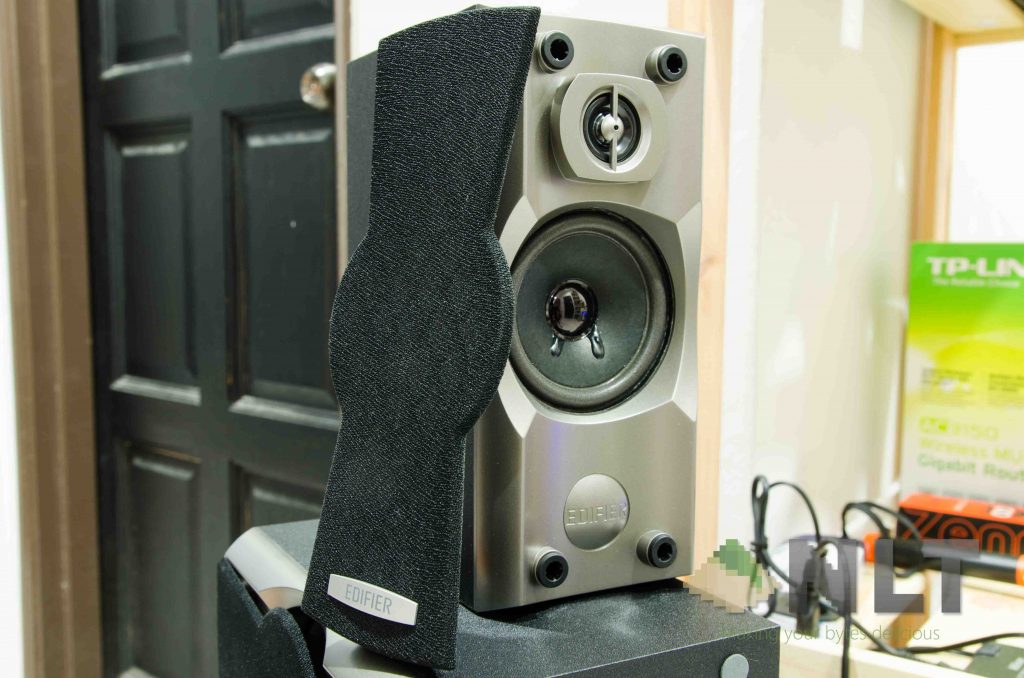
The subwoofer’s mesh is removable – and very simple to do it too. Much more conventional design for this mesh, I’d say.

Then onward to the subwoofer. It has a 6.5-inch driver with a side air intake on the left side, and everything else is on the right side. There’s absolutely nothing at the back.

I’m not sure how I feel about the I/O panel though. On one hand I think it’s great for cable management since the subwoofer can stick to the wall. On another hand, I wish Edifier would separate the panel into two parts – one at the back for all the cables, and everything else at front side closer to the front.
It’s definitely up for debate when it comes to which side you prefer – but I think Edifier tried to kill two birds with one stone by putting all of them together at one place. In my opinion, Sonic Gear positioned the buttons and ports a lot better on the Titan 11 BTMI that we’ve reviewed here.
Features
We’ve mentioned about the ports earlier – and this is where things get a little interesting. Though the Edifier XM6BT looks very desktop speaker-ish, it packs with all the modern features. The aforementioned I/O panel does indeed have a SD card slot, a USB-A port, aux audio jack, and a lot of other buttons. Toggling between input modes will change it to Bluetooth mode.
Though there’s one thing to note – the Bluetooth here can’t be unpaired by the speaker itself. You’ll have to unpair it on the device that was already connected – like the SonicGear Titan 11 BTMI that we’ve reviewed here.

As I find the I/O panel is weirdly positioned, my nitpick was instantly diminished in significance when I found out the remote control works when pointed on the subwoofer’s front panel.
While we’re talking about the remote control, let’s talk about how tiny it is. Great for space saving, but I’m not sure if it increases the probability of someone losing it though. This little remote can do pretty much everything that you need to.

[nextpage title=”Using the Edifier XM6BT”]
This. This is where the Edifier XM6BT is judged. I’ve used and reviewed quite a number of speakers in the past, and my daily driver is a 2.1 speaker with a dedicated amp with an 8-inch subwoofer – so my main comparison will be based upon that.
Listening test
So listening test starts off as usual – Adventure Time by Rouge. Instantly I realize that the bass on this speaker is way better than any speakers of this price range. The bass is strong, its thumps are tight. Every single punch of bass sounds fantastic here. For this particular song, its mids and highs actually sound good.

Moving on to other songs – like The Very Thought of You by the BBC Big Band, it does sound like I’m in a closed room with the orchestra – because of the lack of a proper soundstage. These little speakers sound great – the brass and percussion sounds clear and its woodwind instruments sound good, albeit on the bassier side.

Vocal-based songs like Gangsterlove by Alice Francis sounds great. The mids are clear and has no distortion, and it is not overwhelmed by lows or highs. However, I do find the mids to be a little on the bassy side again.
Overall, I think the sound produced by the Edifier XM6BT is exceptional for its price. Vocals are a little bassy, but that might suit your taste. There is no distortion even at higher volumes.
Bass knob
There is a knob at the I/O panel where you can tune your bass level. I find this knob quite a basic knob actually, but the knob offers a substantial difference. I prefer the bass knob to be turned somewhere ~60% through, and of course you can tune it according to your liking.

You can obviously tune it to have a lot more bass, so songs like Alone by Marshmello can be turned from enjoyable to a rave party instantly.
With Edifier taking the screen-less approach, knobs make sense – and they don’t have to include an internal battery to store the settings whenever the Edifier XM6BT is turned off. Thumbs up for this approach, since I most probably won’t even change the bass level again after I’ve found my sweet spot – much like the Cooler Master’s MasterPulse IEMs that we reviewed here.
Multiple audio input channels
As I’ve mentioned in the earlier sections, the Edifier XM6BT supports 4 different types of audio input – SD card, USB stick, aux audio jack, and Bluetooth.

Sure I can go about and say how weird the buttons and cables are positioned – but those are the things where people wants a constant playlist of music to be played. Those playlists where people don’t usually change. I find this scenario most applicable to cafes or roadshows and along those sort of applications. If I had my speakers set up, I will rarely touch the control panel anyway.
Side note here – the volume control on the Edifier XM6BT is independent of its connected device. So if the Edifier XM6BT is connected via Bluetooth, the volume is different from other audio input streams.
[nextpage title=”Wrap up”]
I can’t deny that the Edifier XM6BT is a very good sounding speaker. The only issue here is the USB port and SD card placement. In a way, it’s good to lock others out from disrupting your rave session during a party, but it might cause some intense questioning around the living room.

Alright – enough nitpicking. Is the Edifier XM6BT really worth its price of RM 239? I will say yes – it sounds a lot better than the SonicGear Titan 11 BTMI. Even has a lot fewer bugs and issues overall. While the placement of ports on the Edifier XM6BT is a little weird, I don’t think anyone will bother hot-swapping them frequently since there’s Bluetooth available anyway.
Like our Facebook Page here at NasiLemakTech.com for more news and in-depth reviews! Also, join our Facebook Group for insightful information and memes!
Subscribe to our YouTube channel too!

