




Over the years, ASUS laptops have been one of the top players in the market. With last year’s arrival of the VivoBook Flip that I personally adore, I expect the brand new ASUS VivoBook S15 to be around the same. However, there are quite a few changes. Here is my full review of the brand new ASUS VivoBook S15 – specifically, the ASUS VivoBook S510U-QBQ387T.
Unboxing
We actually did a quick unboxing video of the VivoBook S15. I find it impressive that ASUS can fit the entire VivoBook S15’s box is tiny. And it has another backpack inside the box as well.
The backpack is actually quite okay to be used – so no worries about that. I mean, at least it has a backpack.
Packaging wise, I’m dumbfounded when I see that tiny box actually contains another box that houses the laptop itself. Opening up reveals a pretty basic slew of contents – the VivoBook S15 itself, a power brick and cord, and some documentation.
[nextpage title=”Design & Ports”]
Let’s see… In terms of aesthetics alone, ASUS has gone with last year’s route. It works with silvery brushed aluminium look and feel. It does look a little bland.

Though, knocking on the laptop reveals that it’s actually plastic. It’s just finished in a way that it looks like brushed aluminium. Everything is pretty much the same as the VivoBook Flip that we reviewed last year.
In a way, the VivoBook S15 is actually very durable I can see that ASUS actually added some reinforcement at the bottom of the VivoBook S15. That is to minimize flexing when pressed around the center of the keyboard. Smart idea and implementation by ASUS.

In terms of the connectivity and ports, the ASUS VivoBook S15 has a pretty good selection of them. There are two USB 2.0 ports and a full-sized SD card reader on the left side, and a USB 3.0 type-A and another USB 3.0 type-C on the right side along with a full-sized HDMI port, headphone/microphone combo jack, and the power jack.


With all of that said, the entire ASUS VivoBook S15 only weighs in at about 1.6kg. Very lightweight for what it offers.

[nextpage title=”Screen – NanoEdge Display”]
This is where the VivoBook S15 stands out the most. ASUS has a new focus on their brand new NanoEdge display during this year’s Computex, and they’re bringing it to a majority of their laptops – including the VivoBook S15.

Personally, I didn’t expect ASUS to equip the budget-oriented VivoBook S15 with their new NanoEdge display. It’s a surreal experience for a laptop – feel almost like using the Samsung Galaxy S8 and Note8 smartphone with a high screen-to-body ratio.
With such a high screen-to-body ratio means two things – smaller bezels and smaller footprint. With a smaller screen footprint, the chassis of the laptop itself will have to shrink too. That means, the VivoBook S15 overall feels like a 14-incher, but it’s actually equipped with a 15.6-inch screen.

Its IPS panel shows that the viewing angles and colors of the VivoBook S15 is good – as expected. Colors are quite good but can definitely be improved further.
That said, the bezel around the screen isn’t actually completely flushed black, though it might appear to be. Look at the top – there’s actually a webcam. An unusable one, actually. Quality is just terrible.

Its hinge angle is pretty good. It can open quite a large angle for comfortable viewing.

[nextpage title=”Trackpad & keyboard”]
First thing’s first. I really would like to see a variant of the ASUS VivoBook S15 with a touch screen. Coupled with that gorgeous NanoEdge display, I can tell you that it’s going to be a fantastic experience.

Tthe trackpad on the VivoBook S15 is actually quite good. It made me contemplate to either take another mouse or use the trackpad whenever I’m on the go. It uses Windows drivers for its trackpad, and there’s even Windows Hello, too.
Windows Hello, in case you don’t know, is their alternative login method to the usual username/password. With Windows Hello, you can sign in with either your fingerprint or your face. Depends on how you want it.

In the case of the VivoBook S15, it’s placed at the top right corner of the trackpad. It’s small enough to not get in the way while still being big enough to fit my index fingerprint. Works as intended, of course.

The keyboard on the VivoBook S15 is actually quite decent for a laptop. Its spacing for each key is a bit too wide in my opinion, but its actuation force and tactile feedback is pretty okay.

The layout of the keyboard, however, is another questionable decision. What’s up with the duplicated function key on the right side? Maybe ASUS thinks it’s easier to use the VivoBook S15 one-handed if there is a function key on each side.
Another thing to take note – the power button is right beside the “delete” key – so be careful and don’t press the wrong key!
[nextpage title=”Performance & Upgradeability”]
Let’s have a quick run through of specs on the ASUS VivoBook S15. Again, we’re reviewing the Asus VivoBook S510U-QBQ387T.
- Intel Core i5-7200U
- NVIDIA GeForce 940MX
- Toshiba THNSNK128GVN8 128GB M.2 SATA III SSD
- Seagate ST1000LM035-1RK172 1TB 5.4k RPM HDD
- 4GB DDR4 RAM
In terms of performance, Dota 2 and CS:GO is alright on this laptop – that’s for sure. Now take note that I say alright – it doesn’t offer the utmost experience that you’ll expect from other laptops.
The RAM situation for the ASUS VivoBook S15 is just terrible in this case. 4GB RAM should never exist anymore, and a minimum of 8GB should be the norm. Seriously, who the heck can survive on 4GB RAM these days anyway? Opening Chrome and a few tabs will swallow all of it in an instant. Don’t tell me that computer illiterates and the elderly generation of users won’t mind – because this laptop is aimed towards students and those who are on the go.
As for the two storage disks, the SSD is indeed SATA III-based and have quite a good read speed. The same cannot be said for its write speed – it’s just terrible.

For the 1TB hard disk, it has pretty average read/write speeds overall. 128GB alone is never enough, so having a 1TB HDD to compliment the overall laptop usage experience is actually a very nice combo.

The fan is actually pretty noisy and kicks up when it’s not under load. It’s a noticeable hum low-pitch hum that can easily be ignored, but that’s pretty subjective and varies from person to person. Not sure why the fan ramps up when idling, but yeah that’s what happened.
Upgradeability
First off, let’s talk about opening up the ASUS VivoBook S15. To be honest, it’s a horrible experience. There are a total of 10 screws at the back… or is that all?

There are actually two more screws hidden underneath both the rubber feet that flank the hinge. Which is a real bummer, as these rubber feet are ridiculously difficult to pry off! Also, the adhesive under it is very prone to damages when prying off the feet.

With a few twists and going around the seams, the bottom panel pops off and reveals the internals – and also quite a lot of wasted space around the sisterboard for the left I/O (top right corner of the picture)

Looking around the mainboard reveals that the ASUS VivoBook S510U is using a single stick of 4GB DDR4 SODIMM RAM from SK Hynix. There’s also another SODIMM RAM slot beside it, so you can add another RAM easily if you choose to. Still, not an excuse for only having 4GB RAM in the first place.

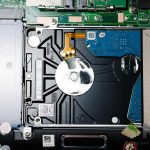
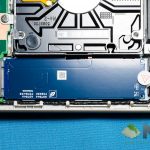
Both the M.2 SATA-III SSD and the HDD are found at the corner. The included 128GB Toshiba THNSNK128GVN8 SSD is a SATA III-based M.2 2280 TLC NAND flash SSD. Swapping this SSD with another one means you’ll have to void the warranty too, as the screw is covered with a sticker. Of course, the 1TB HDD is right beside the SSD.
Its cooling system is awfully simple and easy to access, with a single copper heatpipe going through bough the GPU and CPU dies and into the radiator.

[nextpage title=”Battery”]
When it comes to battery life, I have to say that the ASUS VivoBook S15 performs really good. I can’t bring myself to finish up the battery easily, even though I’m grinding away on YouTube videos all day. Safe to say, even with my workload, it can easily handle about 6 hours easily. And that’s with a very frustrating Chrome user experience I’ve ever used thanks to its 4GB RAM.

The ASUS VivoBook S15 comes with a 65W power brick, which is fairly standard for a laptop of this caliber. The weight of the power brick is pretty good too, comes at about a total of 330 grams in total.
[nextpage title=”Wrapping up the ASUS VivoBook S15 review”]
Let’s just say this – I’m fairly displeased by the fact that the ASUS VivoBook S15 does not have a touchscreen and it’s not a convertible. However, the NanoEdge display is certainly something that I wonder why other laptop manufacturers have not done it yet. Seriously, this laptop is sized like a 14-incher but the screen is actually 15.6-inches.

The entire laptop is actually pretty fun to use. It’s lightweight, has a longlasting battery life, a good trackpad and a fairly okay keyboard, though I wish that the power button is moved out of the keyboard area.
4GB RAM is totally unacceptable. ASUS, no more 4GB RAM laptops in the market, please.
Other than that, I highly recommend the ASUS VivoBook S510U to all those who are seeking for those who are always on the go.
Where to buy?
You can actually get a unit of the ASUS VivoBook S510U-QBQ387T for RM2,699! I’d say this is a really fantastic value for what it offers.
Click here to head over to Lazada.
Like our Facebook Page here at NasiLemakTech.com for more news and in-depth reviews! Also, join our Facebook Group for insightful information and memes!
Subscribe to our YouTube channel too!